Introduction
This is the second in a series of reports covering ransomware detection across major cloud infrastructures. Following our examination of AWS S3 in Part 1, this report focuses on Google Cloud Storage (GCS) and Cloud KMS-based attack vectors.
GCS ransomware is less documented than AWS S3; therefore, this report examines the primary attack vectors by extrapolating known AWS S3 techniques and replicating them in GCP GCS based on research conducted by the Panther Threat Research Team. We will also be exploring detection rules using Panther’s detection engine to help identify these threats, where possible. For each scenario, we provide Cloud Audit Log analysis and corresponding Panther detection logic.
Log Source Requirements
Before deploying these detections, ensure proper Cloud Audit Logs configuration for GCS and Cloud KMS events. GCP's Cloud Audit Logs capture two primary categories:
Admin Activity logs cover control plane operations such as
CreateBucket,SetIamPolicy,CreateCryptoKey, andCreateKeyRing. These are enabled by default.Data Access logs cover data plane operations including
storage.objects.create,storage.objects.get,storage.objects.delete, and KMSEncrypt/Decryptoperations. These must be explicitly enabled as they are disabled by default.
Log Visibility Limitations
GCP Cloud Audit Logs provide limited visibility into ransomware-specific attack techniques, constraining detection capabilities.
CMEK operations generate KMS logs showing that encryption occurred via GCS service accounts, but these logs do not identify which objects or buckets were affected, preventing scope assessment.
CSEK attacks produce no distinguishable log signatures, as customer-supplied encryption keys are never logged and
storage.objects.createevents contain no encryption method indicators.Configuration changes suffer similar limitations, as
storage.buckets.updateevents do not specify which security controls were modified (versioning, lifecycle policies, retention).
GCS Ransomware Prevention
Given the logging visibility gaps, prevention is as critical as detection for GCS ransomware. Organizations should implement the following controls:
Object Versioning and Retention Policies
Enable versioning on all buckets containing sensitive data to allow recovery from object overwrites or deletions.
Use object holds for sensitive data to prevent data destruction.
Configure retention policies to prevent object modification or deletion for a specified period, and apply Bucket Lock to make these policies immutable.
Implement bucket lock to manage retention policies for buckets.
KMS Key Restrictions
Use organization policies to control KMS key usage. Several options can prevent external keys from being used in your project, such as limiting the allowed CMEK keys for a project.
Monitor and alert on any
SetIamPolicychanges that grant GCS service accounts access to KMS keys.
VPC Service Controls:
Implement service perimeters to prevent data exfiltration to external projects. This blocks the exfiltration-based attack path by restricting which projects can access your storage resources.
Least-Privilege IAM
Apply minimal permissions for both Cloud Storage and Cloud KMS operations.
Separate storage administration from day-to-day access, and avoid granting
storage.objects.deleteor KMS key management permissions broadly.Use IAM conditions to further restrict sensitive operations by time, resource, or request attributes.
It is recommended that these controls are always enabled on GCS buckets containing sensitive data to prevent potential ransomware attacks from achieving impactful data destruction.
GCS Ransomware Prerequisites
Similar to AWS S3, several preconditions are necessary for an attacker to achieve complete data loss in a victim environment. An attacker must either enumerate buckets to find ideal candidates with critical security settings disabled or disable these controls themselves. There are several relevant security controls that would prevent a total data loss if enabled:
Object Versioning: Retains previous versions of objects in the same bucket, protecting against accidental deletion or overwrites.
Retention Policies: Can be configured to prevent object deletion or modification for a specified period. Once locked, a retention policy cannot be removed or reduced.
Object Holds: Event-based or temporary holds prevent object deletion regardless of retention policy.
Bucket Lock: Once enabled, prevents the retention policy from being removed or reduced, providing WORM-like compliance.
On the detection side, given that Data Access Logs do not offer visibility into the specific configuration that was changed, we can use the following Panther detection rule to alert on any configuration update or deletion on a specific GCS bucket:
Other prerequisites for a successful ransomware attack include:
Write access to the target GCS bucket: The attacker could achieve this through stolen or compromised service account credentials, misconfigured policies granting excessive storage permissions, or compromised user accounts with excessive permissions.
Cloud KMS permissions (for CMEK encryption-based attacks): The attacker needs
cloudkms.cryptoKeys.setIamPolicyto grant GCS service accounts access.
GCS Ransomware Scenarios
The following section examines ransomware techniques applicable to GCP, drawing from documented methods for AWS S3 we researched at Panther to extrapolate their applicability to GCP environments.
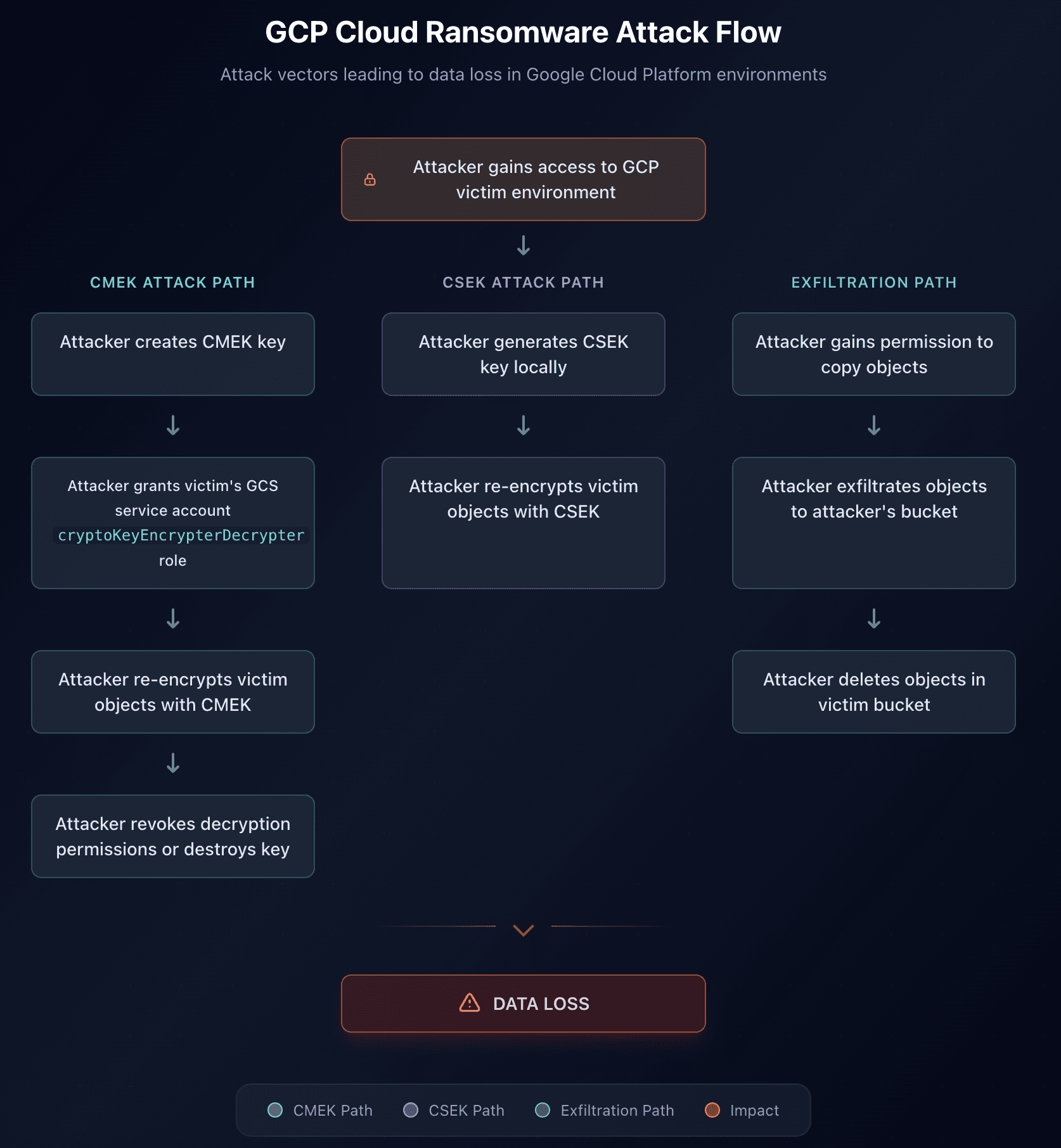
GCS ransomware attacks typically follow one of three paths: a CMEK-based approach where attackers create Cloud KMS keys and grant the victim's GCS service account encryption permissions before re-encrypting data; a CSEK-based approach where attackers generate encryption keys locally and re-encrypt objects directly without any KMS infrastructure; or an exfiltration-based approach where attackers copy data to external buckets before deleting the originals. All paths ultimately result in data loss and potential ransom demands.
Notably, the CSEK path produces fewer detectable log events, as no key creation or IAM policy changes occur. For each scenario, we provide Cloud Audit Log analysis and corresponding Panther detection logic.
Cloud KMS Key Encryption
Similar to the AWS KMS encryption attack documented by RhinoSecurityLabs, an attacker can leverage Google Cloud KMS to encrypt GCS objects with an attacker-controlled key.
On the victim side, key creation and import logs would not be available unless the attacker had sufficient permission to create a keyring and a KMS key in the victim’s project, which is unlikely. What is detectable is step 2, 3 and 4 of the attack chain.
For step 2 of the attack chain, setting an IAM policy on a KMS key to grant encryption access generates the following log:
This log shows a GCS service account being granted encryption/decryption permissions on a KMS key, which is a necessary prerequisite for this ransomware attack. To account for the possibility that an attacker is able to compromise the environment fully to the extent that the key is generated within the victim environment, we can create a detection rule that alerts on any modifications to KMS IAM policies that grant access to storage service accounts with the encryption and decryption role.
Bulk Object Re-Encryption
After the key is granted encryption permissions, as the second step of the attack chain, the attacker needs to encrypt the victim’s objects with an encryption key they control. To encrypt an existing object with an encryption key, the fastest way is to execute a rewrite command, specifying the attacker’s encryption key to encrypt the files as an optional parameter. This generates a cascade of storage.objects.create events where:
The
rewritecommand is logged in thecalledSuppliedUserAgentfield ascommand/rewrite-kThe
authorizationInfoin theprotoPayloadlogs that access was granted to a specific resourceprojects/_/buckets/victim-bucket/objects/victim-file.txtThe
resourceNamefield matches the granted file access
In this case, the generated logs miss an important detail, which is the specific encryption key that was used to re-encrypt objects in the victim bucket. We can nonetheless create a rule for gsutil rewrite -k operations to specifically alert on bulk operations involving the same bucket object rewriting, which may indicate that the specific bucket’s objects are being re-encrypted.
Cross-Account KMS Encrypt Operations from GCS Service Accounts
Still in the second step of the attack chain, another relevant log can indicate that a ransomware attack is taking place. When objects are being encrypted with a KMS key, logs of type cloudkms_cryptokey are generated with a number of Encrypt operations. Although they do not contain the specific object that is being encrypted during this operation, it is still possible to analyze the KMS key being used to extract its project ID. In this specific case, we can compare the logName projectID (belonging to the victim) and the key projectID (belonging to the attacker) and alert on bulk encrypt operations by a cross-account KMS key.
The detection rule will then be:
Bulk Encryption
For a volume-based detection, we can also monitor Encrypt operations taking place within a short timeframe to create a broader rule. This rule is configured with a threshold (e.g., 10 events within 15 minutes) to alert on bulk encryption activity rather than individual operations.
Key Destruction
As the last step of the attack chain, the attacker needs to disable or destroy the KMS key version to deny access to the victim to the encrypted data. Doing so results in the following UpdateCryptoKeyVersion log, where the key state is set to DISABLED or alternatively a DestroyCryptoKeyVersion log is generated for direct key destruction.
We can then create a detection rule that monitors changes to key states:
Exfiltration Path
Similar to the AWS Bling Libra attack pattern, attackers may choose not to rely on encryption keys but to exfiltrate data to external buckets they control before deleting data in the victim environment. In the logs generated by copying objects from one bucket to another, it is possible to see storage.objects.get events where the destination field contains the attacker projectID and the attacker’s bucket.
We can create a detection rule where we can extract the project ID and bucket ID corresponding to the destination bucket and compare it to the source bucket. We can then take advantage of Panther’s dynamic severity to set cross-account object transfer to a higher severity than same-account object transfer, which still warrants monitoring.
Bulk Deletion
In the same fashion as the bulk exfiltration use case, we can see that deleting objects in bulk from a bucket results in the following log, where a storage.objects.delete event is generated for each deleted file.
We can then create a detection rule that monitors bulk deletions.
Post-compromise Detection
Ransom Note Detection
In the same way we have done for AWS S3, we can detect whenever common ransomware filename patterns are uploaded to a GCS bucket by monitoring for storage.objects.create events and extracting the filename from the field resourceName .
We can then create a detection rule that searches for common ransomware filename patterns, as such:
Attack Matrix
Attack Scenario | Required GCS Permissions | Additional Requirements | Recommended Preventive Controls | Panther Detection |
|---|---|---|---|---|
CMEK Encryption | storage.objects.get, storage.objects.create | Attacker needs cloudkms.cryptoKeys.setIamPolicy in the victim environment | Restrict CMEK usage via Policy | GCP KMS Key Granted to GCS Service Account |
Bulk Object Re-encryption | storage.objects.get, storage.objects.create, storage.objects.delete | Access to attacker-controlled KMS key or CSEK | Enable Object Versioning, Retention Policies, Bucket Lock, Object Hold | GCP GCS Bulk Object Rewrite Operation |
Cross-Account KMS Encrypt Operations | storage.objects.get, storage.objects.create | KMS key in external project with encrypt permissions granted to victim's GCS service account | Restrict CMEK usage via Policy | GCP KMS Cross-Project Encryption |
Bulk Exfiltration | storage.objects.get | None | Organization Policy for cross-project restrictions, enable service perimeters | GCP GCS Object Copied to Different Bucket |
Bulk Deletion | storage.objects.delete | None | Enable Object Versioning, Retention Policies, Bucket Lock, Object Hold | GCP GCS Bulk Object Deletion |
Bucket Configuration Changes | storage.buckets.update, storage.buckets.delete | None | Bucket Lock for retention policies, IAM conditions for sensitive operations | GCP Cloud Storage Buckets Modified Or Deleted |
Ransom Note Upload | storage.objects.create | None | Preventive file upload scanning | GCP GCS Ransom Note Upload |
Conclusion
GCS ransomware attacks follow predictable patterns: gaining write access to buckets, leveraging Cloud KMS or customer-supplied keys for encryption, and disabling security controls that would allow recovery. However, detection capabilities are constrained by logging visibility limitations.
Given these visibility gaps, prevention is as critical as detection. Organizations should enforce object versioning and retention policies with Bucket Lock to prevent removal, restrict KMS key usage to organization-owned keys via Organization Policies, implement VPC Service Controls to prevent cross-project data exfiltration, and apply least-privilege IAM for both storage and KMS operations. The detection rules in this report provide coverage where logging allows, but the most effective defense against cloud ransomware remains making the attack prerequisites impossible to achieve in the first place.
Share:
Threat Research
RESOURCES