
Introduction
This is the first in a series of reports covering ransomware detection across major cloud infrastructures. The series will examine different cloud storage services to provide detection logic and hunting guidance for each platform.
Cloud storage services have become primary targets for ransomware operators. Given its ubiquity in enterprise data architectures, AWS S3 presents an attractive target for attackers seeking to encrypt or destroy data for extortion. In January 2025, the Codefinger campaign report became the first widely documented S3 ransomware operation using SSE-C encryption to lock victims out of their data. Months earlier, Unit 42 documented Bling Libra, the group behind ShinyHunters, targeting S3 buckets through credential theft, exfiltration, and deletion.
This report examines the primary attack vectors for S3 ransomware and demonstrates how Panther's policies, detection rules, and correlation capabilities can identify these threats. For each scenario, we provide CloudTrail log analysis and corresponding Panther detection logic.
Log Source Requirements
Before deploying these detections, ensure proper CloudTrail configuration for S3 events. Management events alone are insufficient for detecting object-level ransomware activity.
CloudTrail captures two categories of events: management events and data events.
Management events cover control plane operations such as CreateBucket, PutBucketVersioning, and DeleteBucketReplication.
Data events cover object-level operations, including CopyObject, PutObject, GetObject, and DeleteObject.
By default, CloudTrail only logs management events. The encryption-based attacks and exfiltration scenarios in this report rely on events such as CopyObject and DeleteObject, which require S3 data event logging to be explicitly enabled.
To enable S3 data events, configure your trail to log data events for S3, either for all buckets or for specific high-value buckets. For real-time detection, you can also take advantage of EventBridge.
S3 Ransomware Prerequisites
Several preconditions are necessary for an attacker to achieve complete data loss in a victim environment. AWS provides multiple security configurations to avoid it. Therefore, an attacker must either enumerate buckets and find an ideal candidate with security settings disabled or disable these controls themselves. Having these controls disabled, combined with object encryption or deletion, makes the data unrecoverable on the victim side.
Object Versioning: This is a feature in object storage that retains every version of an object in the same bucket, protecting against accidental deletion or overwrites.
Object Lock: Write Once Read Many (WORM) model for storing objects. This helps prevent objects from being accidentally or maliciously deleted or overwritten for a specified period or indefinitely. Note that once enabled, this cannot be disabled on the bucket.
MFADelete: If configured, this option allows only MFA-authenticated users to permanently delete object versions or change the versioning configuration on an S3 bucket.
It is recommended that these controls are always enabled on S3 buckets to prevent potential ransomware attacks from achieving total data destruction.
Other prerequisites for a successful ransomware attack include:
Write access to the target S3 bucket: The attacker could achieve this in several ways, such as using stolen or compromised AWS credentials, misconfigured IAM policies granting excessive S3 permissions, etc.
Disabled by Default Security Controls
Panther policies can be used to identify buckets with these specific settings disabled, and they are available here. For example, having MFADelete disabled in an S3 bucket will result in the following policy failure, and show up in the Alerts section of your Panther instance:
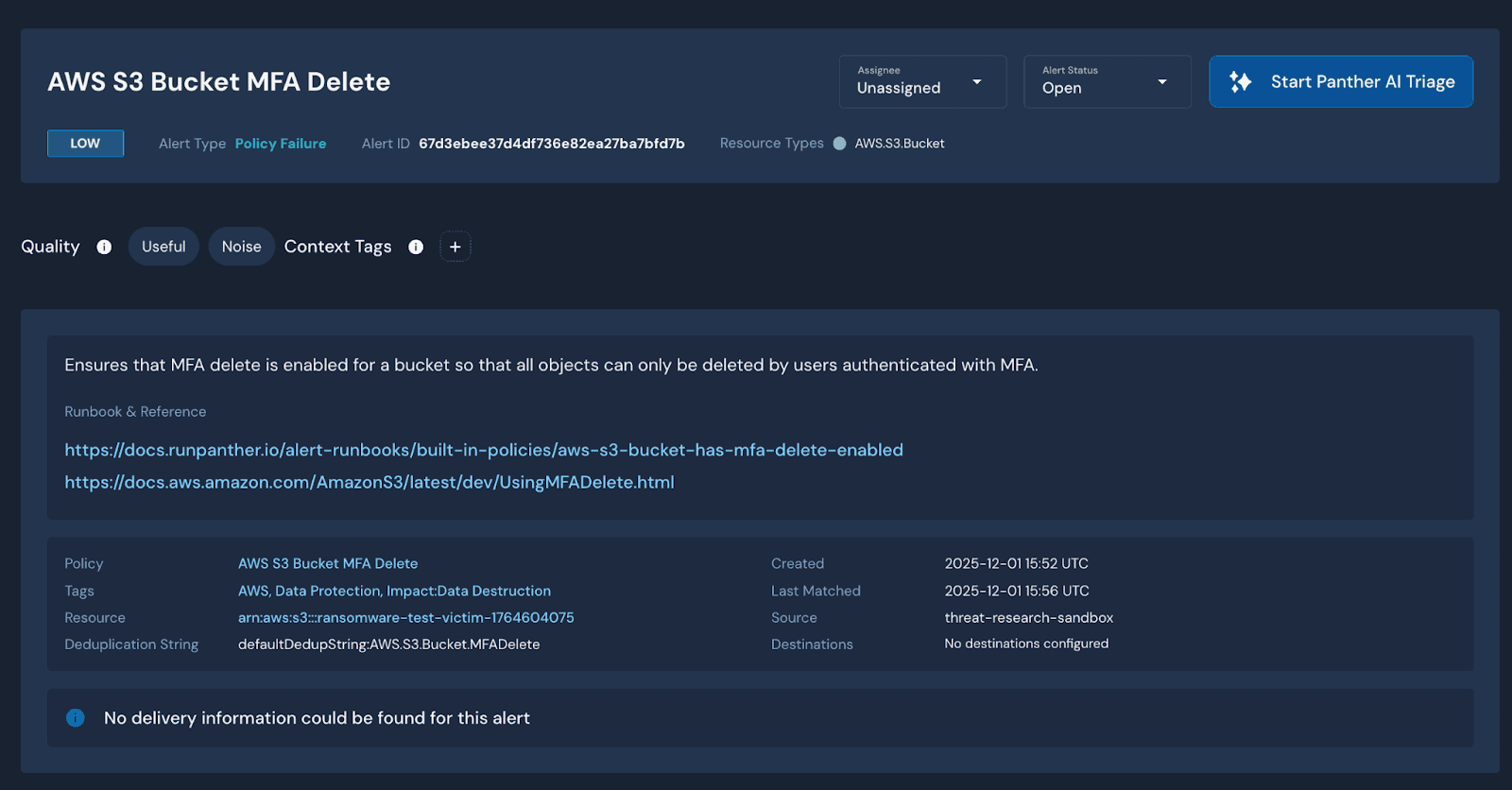
Once these controls are disabled, either through misconfigurations or by the attacker, a malicious actor has several ways to carry out a ransomware attack.
Attacker Disabled Security Controls
To detect when security controls are disabled in preparation for a ransomware attack, we can use Panther correlation rules to identify when the relevant security settings are disabled within a single bucket within a plausible timeframe. For an attacker, it may be necessary to probe the victim's environment before succeeding; therefore, 1 1-hour timeframe seems a likely timeframe.
With correlation rules, the following rule sequence would successfully catch if an attacker succeeds in disabling critical security settings, such as S3 logging, versioning suspended, and MFADelete.
Further Relevant Security Controls
Beyond the core ransomware attack vectors, several security control modifications warrant monitoring. While these actions may not directly constitute ransomware activity, they often precede or accompany an attack. We can take advantage of Panther’s Python rules to create rules relevant to suspicious configuration deletions.
Delete Public Access Block
Removing public access blocks exposes bucket contents to the internet. An attacker may do this to facilitate exfiltration via public URLs or to stage data for external access. This action should rarely occur in production environments.
Delete Bucket Encryption
Removing default encryption settings may indicate an attacker preparing to re-encrypt objects with attacker-controlled keys, or simply degrading security posture. Buckets with sensitive data should have encryption enforced via policy, making this action fail.
Delete Bucket Replication
Disabling cross-region or cross-account replication eliminates backup copies that could be used for recovery. Attackers target replication configurations to ensure victims cannot restore data from replicated buckets.
S3 Ransomware Scenarios
The following section examines ransomware techniques documented by the security community, including both in-the-wild attacks and proof-of-concept research. Each scenario includes CloudTrail log analysis and corresponding Panther detection logic.
External KMS Encryption
RhinoSecurityLabs documented an attack vector that allows an attacker to encrypt files through ServerSideEncryption:KMS. More specifically, an attacker could use a KMS Key generated in an attacker-controlled environment that has been made accessible for encryption to any other AWS account. According to the documentation, AWS KMS is an encryption service aimed at protecting root keys, the highest level encryption keys in the encryption hierarchy. KMS keys are entirely managed within AWS.
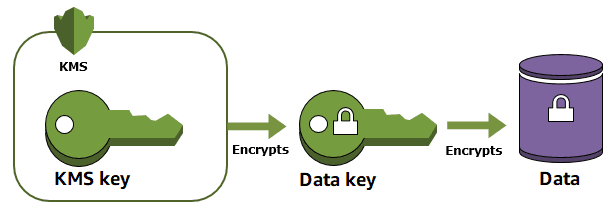
In the logs generated by encrypting an object stored in an S3 bucket with an external KMS key, we can see:
This indicates that an object in the bucket was encrypted with a KMS key. It is then possible to extract the account ID belonging to the KMS key used to encrypt the object.
In this case, we can split the value of the field “x-amz-server-side-encryption-aws-kms-key-id" to achieve it:
"arn:aws:kms:us-west-2:ATTACKER-ACCOUNT-ID:key/0b2c889d-9b5b-4691-946a-fcd73b4a7834"
We can then compare it to the value of the field “recipientAccountID”.
So the final rule would be:
Bring Your Own Key (BYOK)
Another scenario, documented by TrendMicro, involves an attacker importing their own key material into AWS KMS using the Bring Your Own Key (BYOK) feature. Unlike standard AWS-managed KMS keys, imported key material allows the attacker to set an arbitrary expiration time, potentially as short as 24 hours. This is a critical distinction from the standard KMS encryption attack, where AWS enforces a minimum 7-day waiting period before key deletion, giving defenders time to intervene.
From the victim's side, logs pertaining to key creation and import wouldn’t be available in CloudTrail unless the attacker had sufficient permissions to import and create a key directly into the victim account, which is unlikely. A likelier scenario is the availability of an attacker-controlled encryption key generated in their own AWS environment and made world-readable. In this case, what would be detectable is the CopyObject log that contained the usage of a cross-account KMS key, which falls under the same detection use case as the “External KMS Encryption”, where a KMS key belonging to an external AWS account is being used to encrypt objects in a bucket.
External Key Store (XKS)
An attacker could also take advantage of the KMS External Key Store (XKS), an AWS KMS feature that allows users to use cryptographic keys stored outside of AWS. Unlike imported key material, where AWS holds a copy, the key in XKS never leaves the attacker's environment and is not visible to AWS. A proof-of-concept was published in 2024 demonstrating this technique.
From a detection standpoint, the CloudTrail logs appear identical to other cross-account KMS encryption scenarios, so the same External KMS Encryption detection rule applies as well.
SSE-C Encryption
According to a report published by Halcyon in January 2025, a threat actor named Codefinger used compromised AWS keys to gain write access to an AWS S3 victim account and encrypted data with SSE-C encryption. Server-side encryption with customer-provided keys (SSE-C) allows customers to manage their own encryption keys while Amazon S3 handles the encryption and decryption operations, without ever storing the key.
In this scenario, an attacker generates an AES-256 encryption key locally and provides it to S3 during object upload or copy operations. AWS uses the key to encrypt the object, then discards it. AWS only logs the key's HMAC for request verification, but the HMAC cannot be used to recover the original key or decrypt the data. Without the original key, the encrypted objects are unrecoverable by both the victim and AWS support.
This attack has the lowest barrier to entry among the encryption-based scenarios. It requires no KMS permissions and no attacker-side AWS infrastructure. The attacker only needs write access to the target bucket and a locally generated key.
From the logs, we can see the following:
This shows that an object “victim-object”, located in “victim-bucket”, was encrypted using an SSE-C key, meaning that such key is customer-managed. In this case, the customer is the attacker, who has generated this key.
To detect this scenario, we can leverage the presence of the field “x-amz-server-side-encryption-customer-algorithm” to identify when user-managed keys are used to encrypt objects. The final rule would be:
Note that starting April 6, 2026, AWS will disable SSE-C by default on all new S3 general-purpose buckets, and SSE-C will also be disabled for existing buckets that don't have any SSE-C-encrypted data. This significantly changes the threat landscape for Codefinger-style attacks.
Exfiltration and Deletion
In this scenario, documented by Palo Alto Unit 42 in their analysis of threat actor Bling Libra (the group behind ShinyHunters ransomware), the attacker exfiltrates objects and then deletes them from the bucket without using encryption. This approach is more straightforward for attackers to execute since it does not require special encryption keys. Still, it is also more easily detectable by inspecting the source and destination bucket account IDs.
This can be seen in a log such as:
More specifically, the resources field lists the destination and source bucket names and account IDs for the respective buckets.
We can thus compare the account IDs of the source and destination bucket to catch exfiltration to external AWS accounts, as such:
This rule should generate an alert as-is, as it is suspicious to move objects from AWS accounts to another.
To create a higher-severity detection, we can pair this rule with the subsequent deletion of objects in the same source bucket within a short timeframe.
We can create the following correlation rule, which will detect when a minimum of 10 objects are being exfiltrated to an external AWS account, and a minimum of 10 objects have been deleted in the same bucket, in a short timeframe (15 minutes).
Lifecycle Policy Abuse
In Halcyon’s report, part of the attack relied on the attacker setting a short expiration policy (7 days) for the victim’s files, adding urgency to the ransom demand. An attacker with sufficient permissions could configure aggressive S3 lifecycle rules to auto-expire objects. This achieves data destruction without explicit delete calls, potentially evading deletion-focused detections. To detect this, it is possible to use the following Panther policy to find buckets with an expiration lifecycle set to less than 90 days.
Post-compromise
Ransom Note Detection
A post-compromise indicator in ransomware attacks is the upload of ransom notes instructing victims on how to recover their files, usually by paying. With Panther’s Python engine, it’s possible to detect files matching common ransom note patterns by extracting the filename available in “PutObject” events, as such:
Tuning Guidance
Several detection rules in this section identify cross-account activity, such as encryption with external KMS keys or object copies to external buckets. Organizations operating in multi-account AWS environments may trigger these rules during legitimate operations. To reduce false positives, you can apply the following inline filters.
For keys generated in a specific AWS account that is expected to be encrypting objects in a different AWS account, you can apply this filter to the rule “S3 Object Encrypted with External KMS Key”.
“requestParameters.x-amz-server-side-encryption-aws-kms-key-id” does not contain <ALLOWED_AWS_ACCOUNT>
For accounts that are expected to copy files from a bucket to another that is located in a different AWS account, you can apply this filter to the rule “AWS S3 Object Copied to External Account Bucket”.
resources[0].accountId does not contain <ALLOWED_AWS_ACCOUNT>
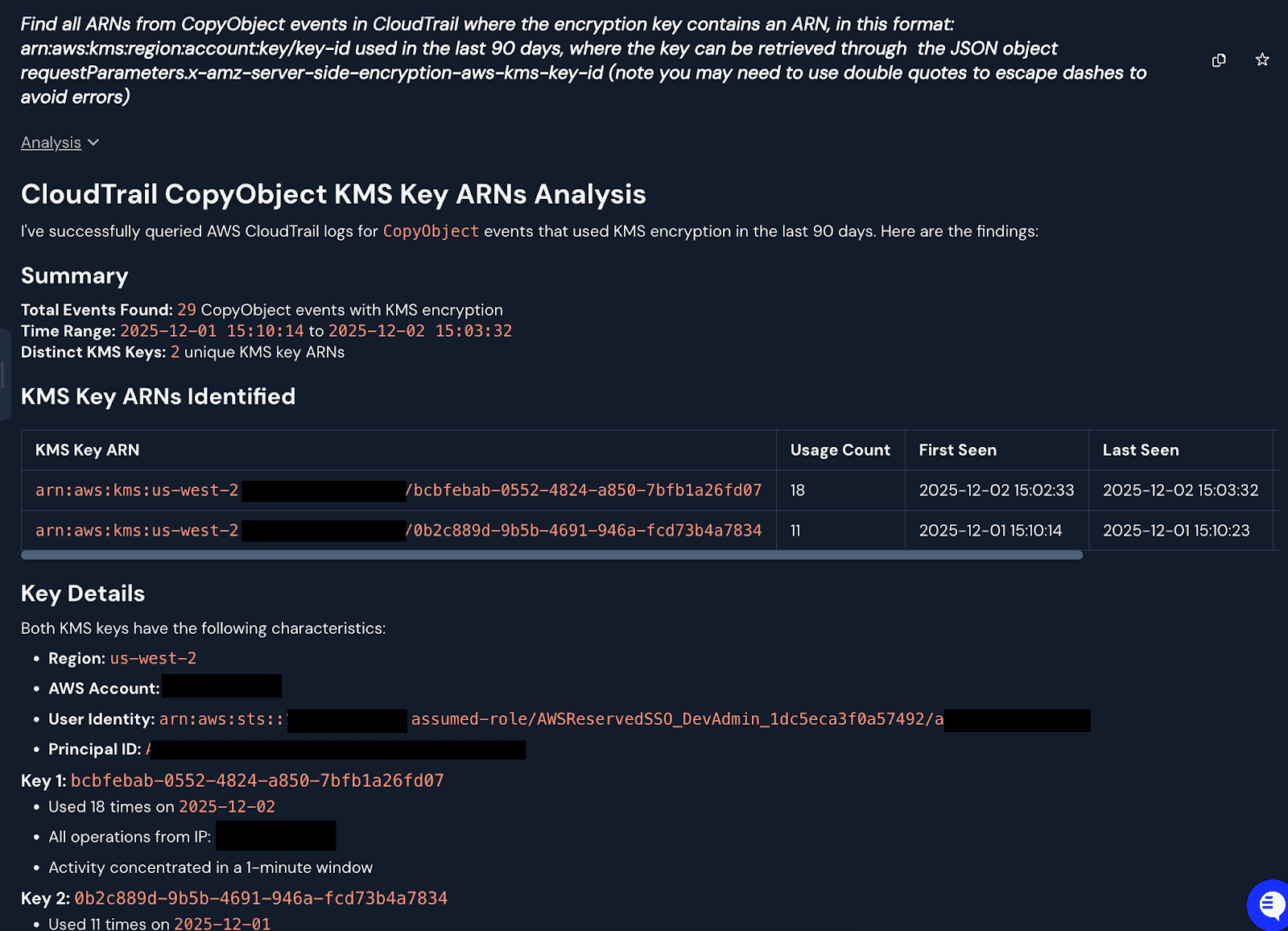
To identify a baseline of legitimate operations involving cross-accounts, you can query your logs with Panther AI to extract which KMS keys, if any, were found performing CopyObject operations on your buckets. From there, it is possible to extract and summarize the KMS key account IDs from the ARNs to populate the inline filters above.
Attack Matrix
Attack Scenario | Required S3 Permissions | Additional Requirements | Recommended Preventive Policies | Panther Detection |
External KMS Encryption | s3:GetObject, s3:PutObject, s3:ListBucket | Attacker must have kms:CreateKey, kms:PutKeyPolicy in their own account. Victim bucket must allow cross-account KMS key usage. | Restrict s3:x-amz-server-side-encryption-aws-kms-key-id to organization-owned key ARNs in bucket policy. | S3 Object Encrypted with External KMS Key |
BYOK (Imported Key Material) | s3:GetObject, s3:PutObject, s3:ListBucket | Attacker needs kms:CreateKey, kms:ImportKeyMaterial, kms:PutKeyPolicy in their own account. Same S3 requirements as External KMS. | Deny kms:GenerateDataKey and kms:Decrypt where kms:KeyOrigin equals EXTERNAL via identity policy or SCP. Set key expiration monitoring alerts. | S3 Object Encrypted with External KMS Key |
External Key Store (XKS) | s3:GetObject, s3:PutObject, s3:ListBucket | Attacker must deploy XKS proxy infrastructure and have kms:CreateCustomKeyStore, kms:CreateKey, kms:PutKeyPolicy in their own account. | Deny kms:GenerateDataKey and kms:Decrypt where kms:KeyOrigin equals EXTERNAL_KEY_STORE via identity policy or SCP. | S3 Object Encrypted with External KMS Key |
SSE-C Encryption | s3:GetObject, s3:PutObject, s3:ListBucket | No KMS permissions required. Attacker generates key locally. Victim bucket must not deny SSE-C. | Deny s3:PutObject where s3:x-amz-server-side-encryption-customer-algorithm is not null via bucket policy or RCP. Apply organization-wide via SCP. | AWS S3 Copy Object with Client-Side Encryption |
Exfiltration | s3:GetObject, s3:ListBucket | s3:PutObject needed on the attacker's destination bucket | Enable Object Lock in Governance or Compliance mode. Enable MFADelete on versioned buckets. | AWS S3 Object Copied to External Account Bucket |
Exfiltration and Deletion | s3:GetObject, s3:ListBucket, s3:DeleteObject, s3:DeleteObjectVersion | Attacker needs s3:PutObject on destination bucket in their own account. MFADelete blocks deletion without MFA. | Enable Object Lock in Governance or Compliance mode. Enable MFADelete on versioned buckets. Restrict s3:DeleteObject to specific roles. Enable cross-region replication to isolated backup account. | AWS S3 Object Exfiltration FOLLOWED BY Object Deletion |
Lifecycle Policy Abuse | s3:PutLifecycleConfiguration, s3:GetLifecycleConfiguration | No additional permissions. Attack succeeds silently via object expiration. | Restrict s3:PutLifecycleConfiguration to infrastructure-as-code roles only. Require minimum expiration thresholds via SCP condition keys. Alert on lifecycle configuration changes. | AWS S3 Bucket Lifecycle Configuration |
Disable Security Controls | s3:PutBucketVersioning, s3:PutBucketLogging, s3:DeletePublicAccessBlock | Some operations require bucket ownership. MFADelete changes require MFA if already enabled. | Deny s3:PutBucketVersioning with Status=Suspended via SCP. Enable MFADelete (cannot be disabled once set). Lock S3 Block Public Access at account level via Organizations. | AWS S3 Security Controls Disabled S3 Bucket Versioning Suspended S3 Bucket Logging Disabled S3 Public Access Block Deleted S3 Bucket Replication Deleted S3 Bucket Encryption Deleted |
Conclusion
S3 ransomware attacks rely on a predictable set of preconditions, such as disabled versioning, absent object lock, and write access to target buckets. Detection strategies should focus on identifying when these controls are modified and when encryption or deletion operations involve external accounts or customer-managed keys.
The Panther rules presented in this report provide coverage across the primary attack vectors. Correlation rules that sequence and group events within defined timeframes offer higher-fidelity alerting by capturing attacker behavior patterns rather than isolated anomalies. Organizations should deploy these detections alongside preventive controls, including enforced object lock, MFADelete requirements, and least-privilege IAM policies for S3 operations.
All detection rules mentioned in this article are available in this pull request.
Interested in more threat research? Read the latest from Panther's team, Elf on a (npm) Shelf.
Share:
Threat Research
RESOURCES