
Introduction
Salesforce is a well-known Customer Relationship Management platform allowing businesses to centralize data for managing customer interactions. That said, with all of the data incorporated in Salesforce, there are a number of ways to utilize logs for investigations and for formulating efficient detections against threats. Salesforce has recently undergone a number of breaches regarding a compromise on app integrations including Salesloft Drift and Gainsight. The influx of attacks on Salesforce integrations prompted a need to detect and mitigate this activity and stop breaches before they occur. This article will delve into the functions of Salesforce forensic investigations, recent breaches, and how Panther can assist you with Salesforce based detections.
Executive Summary
Salesforce is a highly sought after application by both customers and malicious actors. With the influx of third party app integrations in the Salesforce ecosystem, organizations ponder how they can ensure the security of their environments. Malicious actors have been shown to take advantage of various third party Salesforce application integrations like Drift and Gainsight for their own personal gain. The Salesloft Drift chatbot application was abused by attackers to extract compromised OAuth tokens for authentication. Attackers proceeded to perform reconnaissance via SQL queries to exfiltrate sensitive data such as Salesforce objects, cases, accounts, users, and opportunities. The attackers aimed to harvest credentials including long-lived AWS credentials, Snowflake access tokens, and AWS access keys. They aimed to reuse the discovered credentials in future attacks to perform multi-chain attacks. In the gainsight data breach, the attackers utilized the extracted OAuth tokens from the Salesloft Drift breach to compromise the application. Upon being made aware of this incident, Salesforce promptly revoked affected tokens and temporarily removed the Gainsight application from AppXchange.
Detection Capabilities Offered by Panther
Panther hosts a variety of detections that can aid you in strengthening your organization’s security posture.
Salesforce.API.Anomaly.Passthrough - This detection is a passthrough rule that utilizes baseline analysis and statistical anomaly detection to identify unusual API request patterns within Salesforce logs. This detection monitors for API request spikes, unusual query patterns, and bulk enumeration activities. Real Time Event Monitoring logs provide a look into a live stream of API events which is imperative for thorough investigation.
Salesforce.BulkAPI.DataExfiltration - This Panther detection alerts on multiple sequential queries of multiple sensitive object types, large-volume API queries, high-frequency data access requests, and unusual data export activity. Detecting instances of data exfiltration will help you identify threats and track down malicious activity with ease.
Salesforce.ThirdParty.Integration.Monitoring - This Panther detection monitors new or unauthorized third-party application connections, integrations accessing excessive data, and unusual integration access patterns and permission changes. The detection takes into consideration API Request log activity from integrations, changes to Connected Apps via the Audit Trail, OAuth token activity, and logs of applications accessing the organization.
Salesforce.OAuth.Credential.Abuse - This detection monitors Salesforce API access logs for suspicious OAuth token events that may be indicative of malicious behavior. Events that are targeted include OAuth Token Revocations, Failed Token Refresh Attempts, Excessive API Usage, Connected App Activity. These events can hint at token or API abuse so this detection hones in on those events for further visibility.
Recommended Actions
For best practices, short-lived access tokens are recommended to counteract any compromised credentials bad actors may attempt to utilize. Further, high permissions associated with roles (such as read/write) permissions, should require approval first. Performing regular audits of your environment is essential to scan for any hardcoded or exposed credentials and secrets. Exposed credentials are the primary vector adversaries leverage to compromise application security. Third party integrations also need to be monitored and reviewed to ensure its legitimacy. Log auditing is also recommended as it provides a look into activity regarding authentications, access logs, and data exfiltration.
Breaches
Salesloft Drift
A data breach was brought to Cloudflare’s attention on August 23rd in which an external actor gained access to their Salesforce instance.The compromised data consisted of customer support interactions (nested in case objects) which may have leaked access tokens as well. The compromised instance was the Salesloft Drift chatbot integration that allowed all visitors of the website to contact Cloudflare. Threat actors took advantage of compromised OAuth tokens within the third party application to aim to harvest credentials. Hundreds of organizations using the Salesloft Drift integration were affected by this breach. This incident was a perfect example of a supply chain attack. The offending threat actor responsible (as classified by Cloudflare’s Threat Intelligence team) is GRUB1 (UNC6395).
The threat actor ran a number of SQL queries to exfiltrate data and execute their attack. GRUB1 was seeking out sensitive Salesforce data including Salesforce objects, cases, accounts, users, and opportunities. The threat actors’ intent was to harvest credentials that could later be used to access victim’s environments. Sensitive credentials that were targeted include Amazon Web Services (AWS) Access Keys, AKIA passwords, and Snowflake-related access tokens.
Investigation
Using Panther you can utilize Real Time Event Monitoring Logs to review current and previous Salesforce logs aiding in better investigations. Included in these logs, you will also find Threat Detection events that alert on unusual activities.
The Salesforce Drift compromise began with a login from an unfamiliar IP address. This login anomaly can be detected as a Threat Detection event within the Real Time Event Monitoring Logs. The following Panther search shows an example of a login anomaly event in Salesforce:
This login anomaly log incorporates pertinent information regarding the username, source ip, and location. Notably, you can see the anomaly scoring and summary that explains why the login was classed as being anomalous. The LoginAnomalyEventStore event is a key aspect of investigating the initial unfamiliar ip address login as it provides relevant information on the actor.
GRUB1 was able to login due to having compromised OAuth tokens from a previous Github leak they participated in. These tokens allowed the malicious actors to access customer environments and perform the bulk of their reconnaissance and exfiltration activity. The following Panther detection alerts on indicators of potential OAuth credential abuse:
This detection monitors Salesforce API access logs for suspicious OAuth token events that may be indicative of malicious behavior. The following events are targeted as they have a high likelihood of indicating abuse:
1. OAuth Token Revocations → May indicate response to compromise
2. Failed Token Refresh Attempts → Potential brute force or stolen token usage
3. Excessive API Usage → Automated abuse or data exfiltration
4. Connected App Activity → Monitoring for suspicious OAuth app behavior
Below you will find an example of a True Positive triggered by an OAuthTokenRevoked event.
This event includes pertinent information regarding who revoked the OAuthToken and the name of the Connected App that was compromised. In typical scenarios, OAuth Tokens are revoked in response to a suspected or confirmed compromise. This is done for safety reasons so these events are especially helpful when investigating as it contains timestamps and information about the app in question.
From here, an investigation would generally consist of investigating why the token was revoked, looking at failed authentication attempts, and auditing the tokens' access patterns prior to revocation.
This event showcases a failed OAuth Token refresh which could hint at stolen credentials or brute force attempts. An attacker using a stolen or expired token would lead to a failure as well as a bruteforce attempt via guessing token credentials.Legitimate tokens should refresh successfully. The event provides pertinent information regarding the source ip address and the related application along with a timestamp.
With this event information, investigation steps would typically consist of checking for multiple failure refresh and even login attempts from the same ip. Also review the user responsible for this event to note if they typically access the given token as well as the app integration itself.
This event is classed as lower severity but is still relevant. API connected apps could provide insight into OAuth applications making API calls, Here it is key to make a note of particular patterns that could be indicative of malicious or unfamiliar behaviour. This event serves to provide visibility into the API call activity. API call count is taken into consideration when classing the severity of this alert.
Building off of the prior event, this event considers ApiTotalUsage events that exceed a threshold of 10000. This is classed with a high severity as this could be indicative of data scraping or automated abuse. For investigation, it is expected to evaluate the source ip address, the app integration, and prior activity to see if this behavior is expected.
Following this, GRUB1 performed several API calls including GET requests to extract metadata information from the Cloudflare Sales Tenant. This allowed the malicious actors to learn more about the Salesforce objects they aimed to exploit. Anomalous API calls can be detected with the following API Activity Anomaly Panther passthrough rule:
This Panther detection utilizes baseline analysis and statistical anomaly detection to identify unusual API request patterns within Salesforce logs. This detection monitors for API request spikes, unusual query patterns, and bulk enumeration activities. Real Time Event Monitoring logs provide a look into a live stream of API events which is imperative for thorough investigation.
The detection then extracts the Salesforce score on the basis of how anomalous the activity appears to be. The various scores are mapped to their respective Panther severity labels.
Below is an example of an ApiAnomalyEventStore event.
In this instance, an unusual query request broke the threshold with an overwhelming 1250 queries per hour. The severity was marked as critical with a score of 85.5. The event provides vital information including the timestamp, source ip address, the user, and the session key. Investigating this event will involve you looking into the source IP address as well as identifying the queries being made within this short time frame.
After retrieving efficient information about their target, GRUB1 proceeded to run a number of SOQL queries to gain information on Account, User, and Contact objects. You can catch this activity with the Bulk Data Exfiltration Panther Detection:
This Panther detection alerts on multiple sequential queries of multiple sensitive object types, large-volume API queries, high-frequency data access requests, and unusual data export activity. Detecting instances of data exfiltration will help you identify threats and track down malicious activity with ease.
Below is an example of a critical severity event for Bulk API Data exfiltration.
This BulkAPIEventStore event provides very important information including fields like operation type, entity name, records processed, and number of batches. With this information, one can observe the sensitive information of the query extracted and investigate the case using the username and source IP address. This helps with providing context on the situation and attributing the case to a specific actor allowing for thorough investigations.
Gainsight
On November 20th, 2025, Gainsight was disabled by Salesforce due to the application being compromised. The affected assets are:
Community - online space for Gainsight customers to connect, exchange ideas, and access resources
Northpass - Customer education platform acquired by Gainsight
Skilljar - Learning Management System acquired by Gainsight
Staircase - Artificial Intelligence tool for Customer Intelligence acquired by Gainsight
During this time, Salesforce identified API calls using the Gainsight Connected App coming from non whitelisted IPs. A hacking group by the name of Scattered Lapsus$ Hunters (a.k.a. Scattered Spider, LAPSUS$, Shiny Hunters) claimed responsibility for this breach within a Telegram channel. These malicious actors stated that they were able to exploit Gainsight due to their previous breach of Salesloft Drift. The adversaries utilized OAuth tokens within the Gainsight connected Application that allowed the usage of unauthorized API calls within the Salesforce platform. As a response, Salesforce temporarily disabled the Gainsight application as well as revoking all active and refresh tokens.
Shiny Hunters
The ShinyHunters have been partaking in numerous attacks over the years and are aiming to create a Data Leak Site with all of the information that they exfiltrate. They intend to extort victims through vishing efforts instructing victims to pay them in bitcoin within 72 hours.
As part of the summer 2025 Salesforce breaches by the Shiny Hunters, that instance involves a vishing call instructing users to approve a version of the DataLoader application. The name and branding for this application differs from the legitimate one.
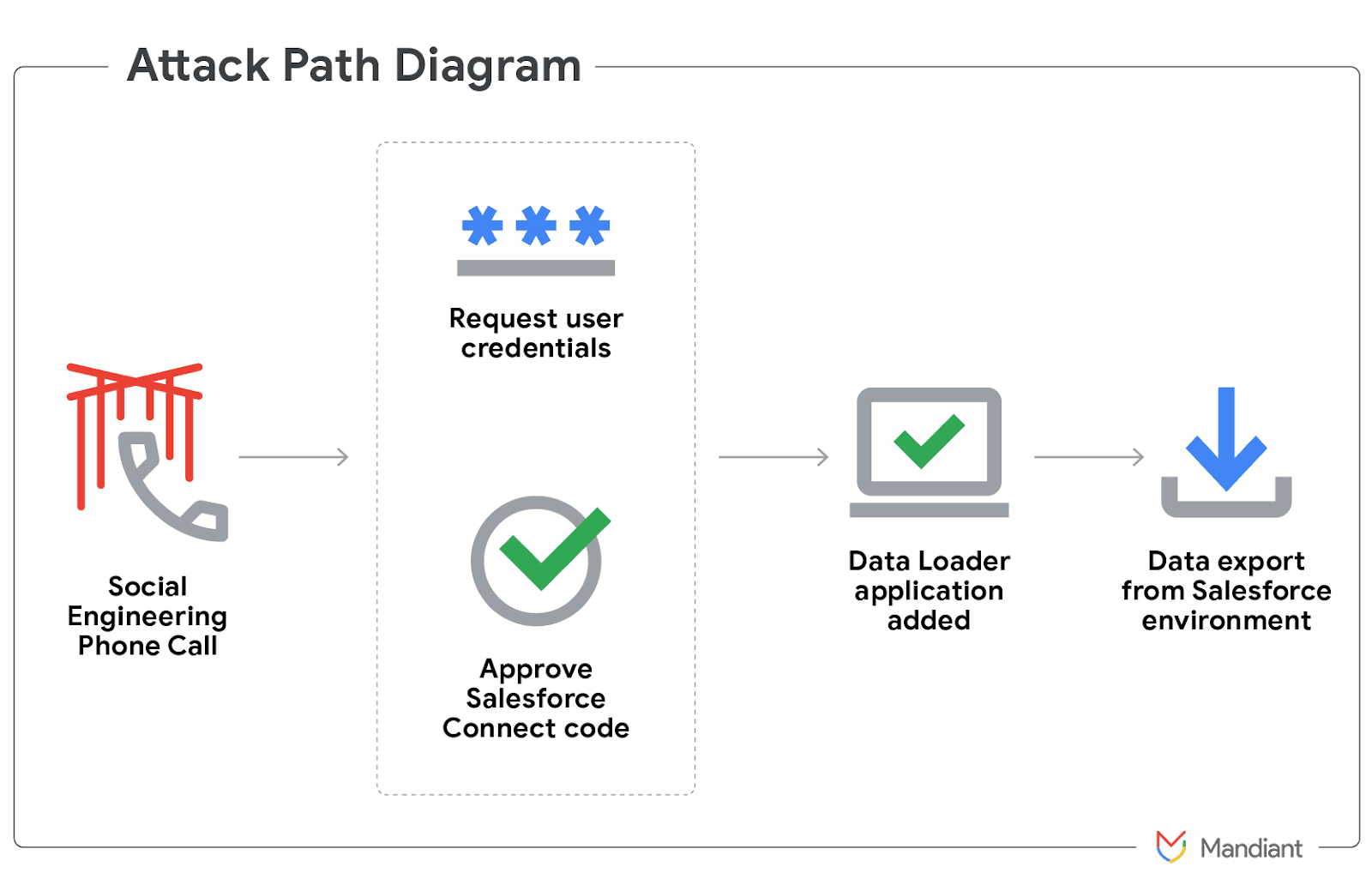
Once the threat actor gained access they exfiltrated data and used the stolen credentials to move laterally through victim’s networks across various platforms (e.g. Microsoft, Okta). The actors also utilized the Mullvad VPN IP addresses to perform data exfiltration and also requested user authentication and MFA codes during these vishing calls.
For context, Data Loader is an application developed by Salesforce which allows for the import, export, and update of large data volumes within the Salesforce platform. Data Loader supports the use of OAuth and allows for direct app integration. Threat actors goaded victims to enter a connection code in the Salesforce connect setup page, which links the threat actor’s Data Loader to the environment of the victim. Threat actors were able to evade detection by only extracting a small amount of data (e.g. Account, Case, User records) at a time and by renaming the Data Loader application to “My Ticket Portal”.
“Gainsight was a customer of Salesloft Drift; they were affected and therefore compromised entirely by us,” a spokesperson for the ShinyHunters group told TechCrunch.
T1621 Multi-Factor Authentication Request Generation
The SLSH group weaponized MFA flows by generating MFA prompts and tricking targets into approving them. They used this methodology in combination with vishing and prompts to authorize connected apps or to complete OAuth consent screens.
T1657 Financial Theft
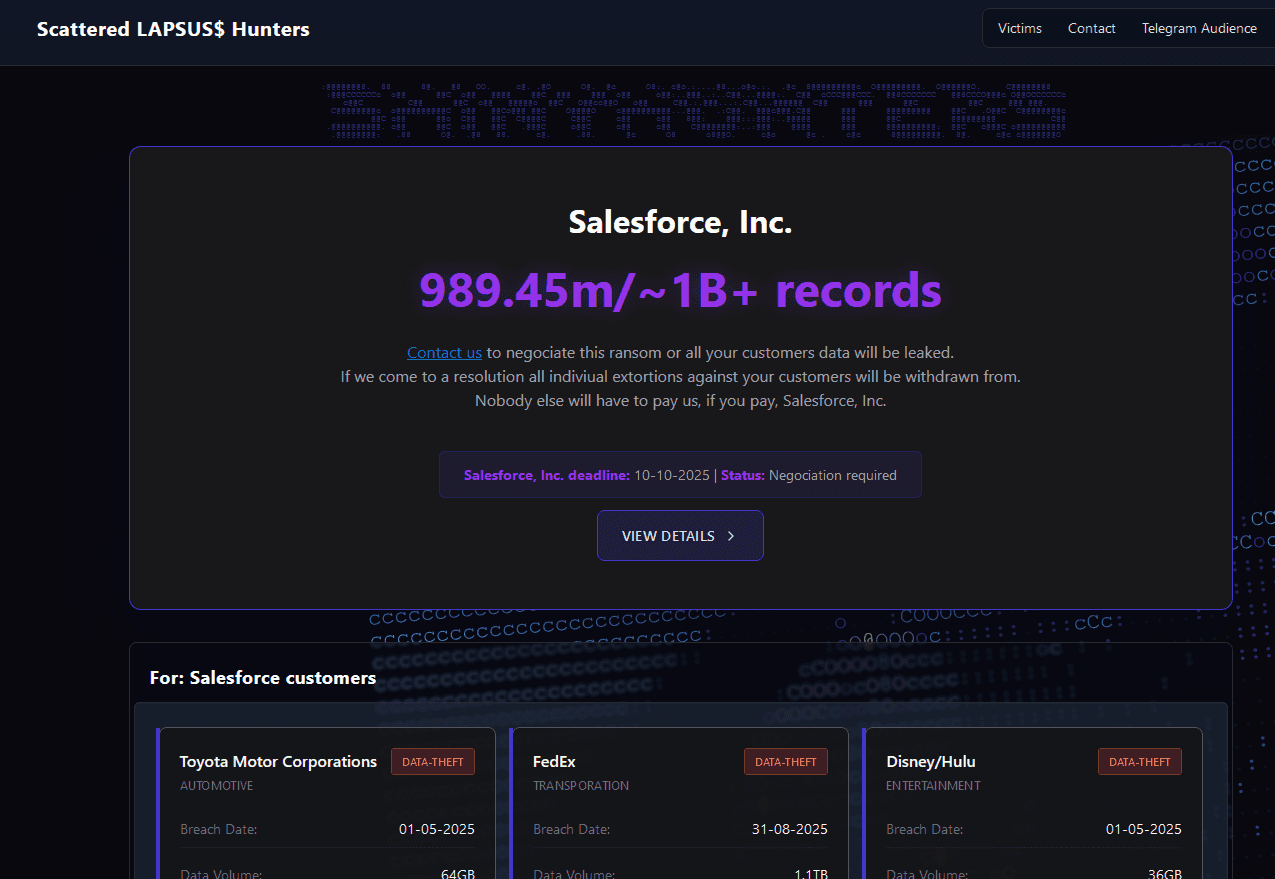
SLSH hosted an extortionware portal on the TOR Onion network hosting public leaks, exfiltrated customer data, etc. On this extortionware portal they listed affected Salesforce customers along with the amount of data that they claimed to have stolen. This site was made as a means to pressure victims therefore extracting financial gain.
Partial Content of their site can be found below:
Investigation
This attack took advantage of social engineering tactics in conjunction with the generation of MFA prompts, OAuth requests, and unofficial app integrations. Third party integration monitoring is key to ensure that only official applications are connected and that existing third party integrations aren’t compromised. The following Panther detection monitors third-party Salesforce integrations:
This Panther detection monitors new or unauthorized third-party application connections, integrations accessing excessive data, and unusual integration access patterns and permission changes. The detection takes into consideration API Request log activity from integrations, changes to Connected Apps via the Audit Trail, OAuth token activity, and logs of applications accessing the organization.
Below you can find an example log of anomalous Third Party Integration activities.
This ConnectedAppUsageEventStore event provides us with the CONNECTED_APP_NAME and the OAUTH_SCOPES. This is especially useful information for making note of high permissions being granted to an external app as well as the name of the application. Further alert context is helpful for investigation as it includes information like the source ip address, the username responsible for the activity, and a timestamp.
Another sample event from the third-party integration monitoring detection is the ApiConnectedApp event. This event makes a note of the external app connected and its name under the CONNECTED_APP_NAME field. The OAUTH_SCOPES field notes the scopes that were granted to the connected app. This can provide context on the app permissions and bring our attention to high permissions granted. The API_TOTAL_COUNT field gives us the number of API calls which is imperative for determining excessive API calls within a short period of time.
During this attack the Shiny Hunters performed a number of API calls coming from non whitelisted IPs. Monitoring the ip addresses related to suspicious API call events is crucial to ensure the safety of your organization.
Attack Overview
Aspect | Salesloft Drift Breach | Gainsight Breach |
Initial Compromise | Github account of Salesforce breach (March - June 2025) led to the theft of Salesforce OAuth tokens and API keys | Attackers used tokens stolen from Salesloft Drift breach to compromise Gainsight’s Salesforce connected applications. |
Attack Vector | OAuth token theft and misuse led to attackers using legitimate tokens (Drift) to access Salesforce customer instances. | Third party Gainsight apps were “trusted” which provided access to customer Salesforce organizations. |
Timeline of Active Exploitation | Automated data extraction from several customer environments. August 8 - 18 2025. | Mid to late November 2025 (Salesforce alert around November 20). |
Scope of Impacted Systems /Orgs | 700+ organizations were cited including large enterprises and tech companies. | Approximately 200+ Salesforce customer instances were confirmed. |
Data accessed / Exfiltrated | CRM data: accounts, contacts, support cases, opportunities, user data, and API keys. | Business contacts and Salesforce case data/metadata. CRM-layer data accessible via the Gainsight integrations. |
Detection & Containment | Salesforce and Salesloft revoked tokens on August 20th, removed app and disabled integrations, and third-party forensic investigations. | Salesforce revoked Gainsight tokens and removed apps from AppExchange. |
Root Cause | OAuth scopes that are overly permissive and insufficient protection surrounding OAuth tokens. | Supply chain risk attributed to Gainsight app integration compromise. |
Best Practices
Knowing what logs you have available goes a long way in acknowledging where to look. Salesforce has an event monitoring system that provides log sources including Real Time Event Monitoring (RTEM).
Log Source | Description |
Real Time Event Monitoring (RTEM) | For active security monitoring, this data is stored for up to 6 months. Unusual activity is alerted with the SalesForce Threat Detection Events feature. |
In terms of forensic investigations, Panther provides you with the ability to detect anomalous patterns, review user permissions, check user activities across log sources, and more.
Tips for Investigation and Best Practices
Frequent Credential Rotation
Review Third Party Integrations
Review Salesforce Event Monitoring Logs for Suspicious Activity
Review Authentication Activity
Search Salesforce Objects for Potential Secrets
Use TruffleHog to find exposed or hard coded credentials and secrets
Analyze API calls, Exports, and File Downloads
Review User Permissions with “Who Sees What” Explorer
Track User Activities Across Various Log Sources
For best practice, it is advised to frequently rotate credentials. Frequent credential rotation makes it more difficult for malicious actors to leverage compromised credentials. Relative to this, it is key to utilize tools such as TruffleHog to monitor your environment for exposed or hard coded credentials and secrets. Exposed secrets are the primary way that malicious actors carry out multi-chain attacks as seen in recent Salesforce integration breaches. As showcased in the Salesforce Drift and Gainsight incidents, third party integration monitoring is imperative for your organization's overall security posture. Performing regular audits of external integrations and leveraging Panther detections will allow your organization to be made aware of any unauthorized connections. Further, regular log auditing is vital to scope out activity including but not limited to, authentication activity, access logs, and data exfiltration. Panther’s passthrough rules for bulk data exfiltration will showcase potentially malicious instances of exfiltrated data for your examination. Ultimately, it is necessary to perform regular audits, integrate relevant detections, rotate credentials, and perform regular log monitoring to aid in the safety of your organization’s data while using the Salesforce application and any respective integrations.
Conclusion
The Salesloft Drift and Gainsight breaches targeted a large number of victims compromising a wide array of sensitive data. These integrations point to a bigger issue regarding how supply chain attacks can lead to massive data leaks and system compromise. Several notable companies were hit by this breach including but not limited to Cloudflare, Palo Alto Networks, Profpoint and more. The Salesforce Drift breach alone affected 700+ organizations while the Gainsight breach affected 200+ Salesforce customer instances. Not only did these breaches leak out CRM data, access keys, and Case objects, but these credentials were also reused to access other instances. This is exactly how the Shiny Hunters were able to chain attacks from the Salesloft Drift attack to the Gainsight attack. This was possible due to the fact that some Salesforce “Case” objects contain sensitive information such as support logs, configuration details, license information, and even embedded secrets.
These breaches can lead to negative impact to organizations due to the potential for further exploitation as already depicted with the Salesloft Drift to Gain sight breaches. Further, breaches such as these also lead to operational disruption when integrations are suddenly revoked and deactivated. Incidents such as these shed light on the need for organizations to gauge supply chain attack risks that stem from third-party integrations. While disclosure on the exact impact of this incident is still under investigation, it is safe to say that this brings notice to the need for efficient detections.
Dig into more of Panther's threat research with our two part series: LLM Threats and Defensive Strategies.
Appendix
IOCs
Campaign | IOC Type | Value | Description |
Salesloft Drift | Malicious User-Agent string | Salesforce-Multi-Org-Fetcher/1.0 | |
Salesloft Drift | Malicious User-Agent string | Salesforce-CLI/1.0 | |
Salesloft Drift | User-Agent string | python-requests/2.32.4 | |
Salesloft Drift | User-Agent string | Python/3.11 aiohttp/3.12.15 | |
Salesloft Drift | DigitalOcean | 208.68.36.90 | |
Salesloft Drift | Amazon Web Services | 44.215.108.109 | |
Salesloft Drift | Tor exit node | 154.41.95.2 | |
Salesloft Drift | Tor exit node | 176.65.149.100 | |
Salesloft Drift | Tor exit node | 179.43.159.198 | |
Salesloft Drift | Tor exit node | 185.130.47.58 | |
Salesloft Drift | Tor exit node | 185.207.107.130 | |
Salesloft Drift | Tor exit node | 185.220.101.133 | |
Salesloft Drift | Tor exit node | 185.220.101.143 | |
Salesloft Drift | Tor exit node | 185.220.101.164 | |
Salesloft Drift | Tor exit node | 185.220.101.167 | |
Salesloft Drift | Tor exit node | 185.220.101.169 | |
Salesloft Drift | Tor exit node | 185.220.101.180 | |
Salesloft Drift | Tor exit node | 185.220.101.185 | |
Salesloft Drift | Tor exit node | 185.220.101.33 | |
Salesloft Drift | Tor exit node | 192.42.116.179 | |
Salesloft Drift | Tor exit node | 192.42.116.20 | |
Salesloft Drift | Tor exit node | 194.15.36.117 | |
Salesloft Drift | Tor exit node | 195.47.238.178 | |
Salesloft Drift | Tor exit node | 195.47.238.83 | |
Gainsight | IP Address | 104.3.11.1 | AT&T IP; reconnaissance and unauthorized access. |
Gainsight | IP Address | 198.54.135.148 | Mullvad VPN proxy IP; reconnaissance and unauthorized access. |
Gainsight | IP Address | 198.54.135.197 | Mullvad VPN proxy IP; reconnaissance and unauthorized access. |
Gainsight | IP Address | 198.54.135.205 | Mullvad VPN proxy IP; reconnaissance and unauthorized access. |
Gainsight | IP Address | 146.70.171.216 | Mullvad VPN proxy IP; reconnaissance and unauthorized access. |
Gainsight | IP Address | 169.150.203.245 | Surfshark VPN proxy IP; reconnaissance and unauthorized access. |
Gainsight | IP Address | 172.113.237.48 | NSocks VPN proxy IP; reconnaissance and unauthorized access. |
Gainsight | IP Address | 45.149.173.227 | Surfshark VPN proxy IP; reconnaissance and unauthorized access. |
Gainsight | IP Address | 135.134.96.76 | IProxyShop VPN proxy IP; reconnaissance and unauthorized access. |
Gainsight | IP Address | 65.195.111.21 | IProxyShop VPN proxy IP; reconnaissance and unauthorized access. |
Gainsight | IP Address | 65.195.105.81 | Nexx VPN proxy IP; reconnaissance and unauthorized access. |
Gainsight | IP Address | 65.195.105.153 | ProxySeller VPN proxy IP; reconnaissance and unauthorized access. |
Gainsight | IP Address | 45.66.35.35 | Tor VPN proxy IP; reconnaissance and unauthorized access. |
Gainsight | IP Address | 146.70.174.69 | Proton VPN proxy IP; reconnaissance and unauthorized access. |
Gainsight | IP Address | 82.163.174.83 | ProxySeller VPN proxy IP; reconnaissance and unauthorized access. |
Gainsight | IP Address | 3.239.45.43 | AWS IP; reconnaissance against customers with compromised Gainsight access token. |
Gainsight | User Agent | python-requests/2.28.1 | Not an expected user agent string used by Gainsight connected app; use in conjunction with other IOCs shared. |
Gainsight | User Agent | python-requests/2.32.3 | Not an expected user agent string used by Gainsight connected app; use in conjunction with other IOCs shared. |
Gainsight | User Agent | python/3.11 aiohttp/3.13.1 | Not an expected user agent string used by Gainsight connected app; use in conjunction with other IOCs shared. |
Gainsight | User Agent | Salesforce-Multi-Org-Fetcher/1.0 | Leveraged by threat actor for unauthorized access; also observed in Salesloft Drift activity |
Salesloft Drift Attack Sequence
Date/Time (UTC) | Event Description |
2025-08-09 11:51:13 | GRUB1 observed leveraging Trufflehog and attempting to verify a token against a Cloudflare Customer Tenant: client/v4/user/tokens/verify, and received a 404 error from 44[.]215[.]108[.]109 |
2025-08-12 22:14:08 | GRUB1 logged into Cloudflare’s Salesforce tenant from 44[.]215[.]108[.]109 |
2025-08-12 22:14:09 | GRUB1 sent a GET request for a list of objects in Cloudflare’s Salesforce tenant: /services/data/v58.0/sobjects/ |
2025-08-13 19:33:02 | GRUB1 logged into Cloudflare’s Salesforce tenant from 44[.]215[.]108[.]109 |
2025-08-13 19:33:03 | GRUB1 sent a GET request for a list of objects in Cloudflare's Salesforce tenant: /services/data/v58.0/sobjects/ |
2025-08-13 19:33:07 and 19:33:09 | GRUB1 sent a GET request for metadata information for case in Cloudflare’s Salesforce tenant: /services/data/v58.0/sobjects/Case/describe/ |
2025-08-13 19:33:11 | GRUB1 first observed executing Salesforce query: A broad query against the case object by 44[.]215[.]108[.]109. This produced one of the earliest and larger data responses, consistent with reconnaissance via bulk record retrieval |
2025-08-14 0:17:40 | GRUB1 lists available objects and counts “Account”, “Contact” and “User” objects. |
2025-08-14 00:17:47 | GRUB1 queried Account table in Cloudflare’s Salesforce tenant: “SELECT COUNT() FROM Account” query on Cloudflare’s Salesforce tenant |
2025-08-14 00:17:51 | GRUB1 queried Contact table in Cloudflare’s Salesforce tenant: “SELECT COUNT() FROM Contact” query on Cloudflare’s Salesforce tenant |
2025-08-14 00:18:00 | GRUB1 queried User table in Cloudflare’s Salesforce tenant: “SELECT COUNT() FROM User” query on Cloudflare’s Salesforce tenant |
2025-08-14 04:34:39 | GRUB1 queried "CaseTeamMemberHistory” in Cloudflare’s Salesforce tenant: “SELECT Id, IsDeleted, Name, CreatedDate, CreatedById, LastModifiedDate, LastModifiedById, SystemModstamp, LastViewedDate, LastReferencedDate, Case__c FROM CaseTeamMemberHistory__c LIMIT 5000” |
2025-08-14 11:09:14 | GRUB1 queried Organization table in Cloudflare’s Salesforce tenant: “SELECT Id, Name, OrganizationType, InstanceName, IsSandbox FROM Organization LIMIT 1” |
2025-08-14 11:09:21 | GRUB1 queried User table in Cloudflare’s Salesforce tenant: “SELECT Id, Username, Email, FirstName, LastName, Name, Title, CompanyName, Department, Division, Phone, MobilePhone, IsActive, LastLoginDate, CreatedDate, LastModifiedDate, TimeZoneSidKey, LocaleSidKey, LanguageLocaleKey, EmailEncodingKey FROM User WHERE IsActive = :x ORDER BY LastLoginDate DESC NULLS LAST LIMIT 20” |
2025-08-14 11:09:22 | GRUB1 sent a GET request on LimitSnapshot in Cloudflare’s Salesforce tenant: /services/data/v58.0/limits/ |
2025-08-16 19:26:37 | GRUB1 logged into Cloudflare’s Salesforce tenant from 44[.]215[.]108[.]109 |
2025-08-16 19:28:08 | GRUB1 queried Cases table in Cloudflare’s Salesforce tenant: SELECT COUNT() FROM Case |
2025-08-17 11:11:23 | GRUB1 logged into Cloudflare’s Salesforce tenant from 208[.]68[.]36[.]90 |
2025-08-17 11:11:55 | GRUB1 queried Case table in Cloudflare’s Salesforce tenant: SELECT COUNT() FROM Case |
2025-08-17 11:11:56 to 11:15:18 | GRUB1 leveraged Salesforce BulkAPI 2.0 from 208[.]68[.]36[.]90 to execute a job to exfiltrate the Cases object |
2025-08-17 11:15:42 | GRUB1 leveraged Salesforce Bulk API 2.0 from 208[.]68[.]36[.]90 to delete the recently executed job used to exfiltrate the Cases object |
Panther Detections
Threat-573: OAuth Credential Abuse Detection
Threat-576: Bulk Data Exfiltration Detection
Threat-575: Third-Party Integration Monitoring
Threat-574: API Activity Anomaly Detection
References
https://www.salesforce.com/blog/a-primer-on-forensic-investigation-of-salesforce-security-incidents/
https://help.salesforce.com/s/articleView?id=005229029&type=1
https://cloud.google.com/blog/topics/threat-intelligence/voice-phishing-data-extortion
https://krebsonsecurity.com/2025/11/meet-rey-the-admin-of-scattered-lapsus-hunters/
https://cloud.google.com/blog/topics/threat-intelligence/unc6040-proactive-hardening-recommendations
https://communities.gainsight.com/community-news-2/salesforce-security-advisory-faqs-29809
https://help.salesforce.com/s/articleView?id=005229029&type=1
Share:
Threat Research
RESOURCES