
BLOG
Autonomous Threat Hunting
How AI Finds Coverage Gaps Before Incidents Do
Katie
Campisi
Most people get into security for investigative work: understanding how attackers think, finding things that shouldn't be there, building detection logic that actually holds up. The reality of most SOC roles is that the operational workload crowds that work out almost entirely. Alert queues, manual triage, and context-switching between tools consume the day, and by the time the queue is clear there's nothing left for the proactive work that drew you to the field.
When hunting runs continuously without someone initiating it, the work that gets displaced is the toil, not the interesting stuff. Practitioners can focus on what actually requires human judgment: threat modeling, detection engineering, and building coverage that doesn't exist yet.
The Coverage Problem With Rule-Based Detection
Panther founder and CEO Jack Naglieri put the structural problem plainly in his post Agents That Don't Wait for Rules to Fire: "Coverage in a rule-based model is bounded by two things: what your detection engineers know to look for, and how much time they have to write and maintain rules for it."
Rules are deterministic; they fire when conditions match. Everything outside those conditions goes unexamined unless someone explicitly goes looking. Hunting exists to cover that territory, but in most SOCs it's a project that happens a few times a year, if it happens at all. Coverage gaps tend to surface during post-incident reviews, when the team traces back through logs to find activity that should have been caught. That's a costly way to find out what you were missing.
What Autonomous Threat Hunting Actually Looks Like
Configuring an AI agent to hunt continuously means giving it a cadence, a data source, and somewhere to send its findings. The output goes wherever your team already reviews work: a Slack channel, a Jira ticket, a Notion page, a morning security review. No analyst has to initiate the run.
The screenshot below shows this in action. A natural language prompt asks Panther AI to find all hits from a specific IP in the last hour and post results to a Slack channel. The AI queries across AWS.CloudTrail, Okta.SystemLog, and detection signals simultaneously, then posts a structured threat hunt summary (findings, assessment, and recommendation included) directly to the team's Slack channel before anyone opens their laptop.
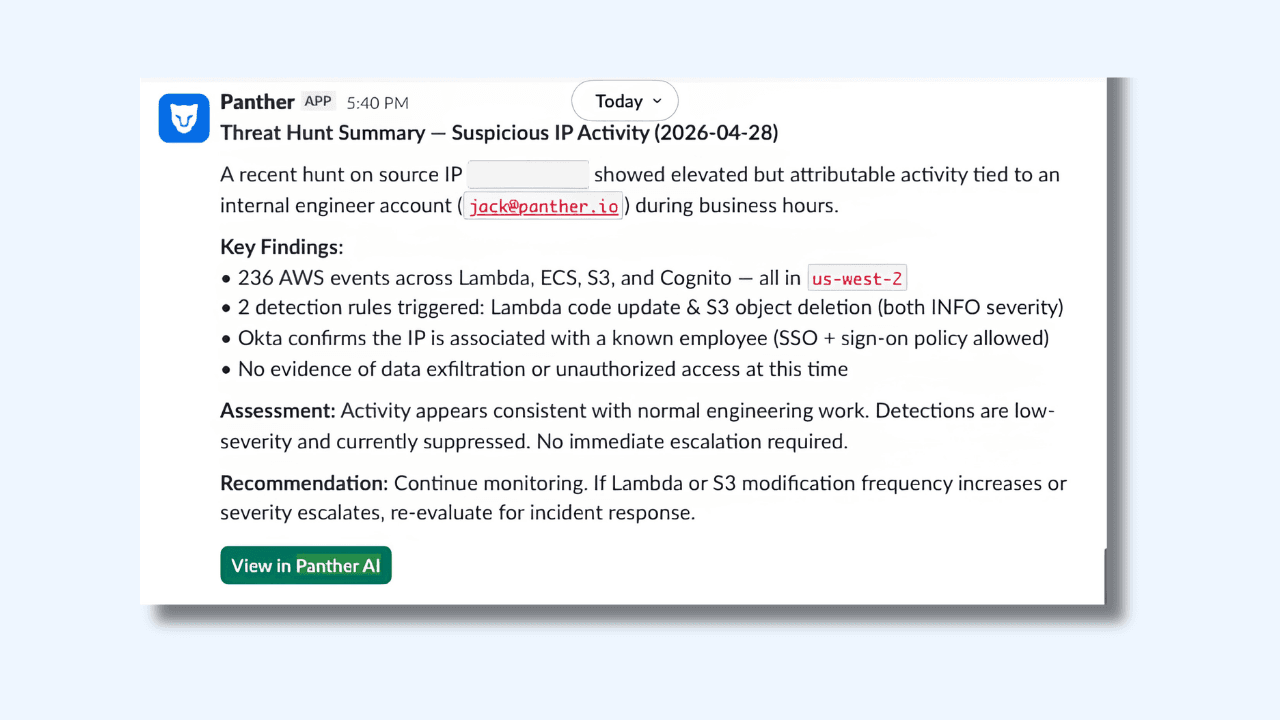
The findings in that example include 236 AWS events across Lambda, ECS, S3, and Cognito, two detection rules triggered, Okta confirmation that the IP is associated with a known employee, and an assessment that no immediate escalation is required. An analyst reviewing this in the morning has everything they need to make a call in under two minutes, without having run a single query themselves.
What to Put in an Autonomous Hunting Scope
The practical question for teams getting started: what do you actually configure? The answer is less about writing queries and more about articulating a threat model.
A hunting scope tells the AI what category of activity to review, why it matters, how to distinguish routine operations from attacker behavior, what the common false positives look like, and which enrichment sources to consult. Jack's post walks through this framework in detail and is worth reading in full.
Traditional detection engineering produces a rule: a static pattern that sits waiting for a match to fire an alert. An autonomous hunting scope produces something different, closer to a standing brief. It encodes the threat model, what good vs. bad looks like, and where to pull context from. And instead of waiting to fire, an agent runs that logic continuously. You're no longer asking “did this exact pattern occur?” You're asking “is there anything in the last 24 hours worth a closer look?”
Here's a condensed example for IAM activity in AWS:
Scope: Review all IAM signals from the past 24 hours, including role creations, policy attachments, trust policy modifications, and access key generation.
Threat model: Attackers who have gained initial access to an AWS environment frequently escalate privileges by creating new IAM roles or modifying trust relationships to enable cross-account movement. IAM modifications are among the highest-value signals in a cloud environment because they directly affect who can access what.
Assessing benign vs. risky: Most IAM changes in a healthy environment come from infrastructure-as-code pipelines running through CI/CD systems with known service roles. A role creation by a Terraform execution role during a deployment window, correlated with a recent merge in the infrastructure repository, is almost certainly routine. A role creation by a human identity through the console (especially one that doesn't typically make IAM changes) is worth investigating.
Common false positives: Platform engineering teams making manual IAM changes during incident remediation. Automated security tooling that generates IAM signals as a side effect. Sandbox or development accounts where IAM experimentation is expected.
Investigation steps: For each IAM signal, check the identity's activity history over the past 30 days to establish whether IAM changes are part of their normal pattern. Check the identity provider via MCP to determine the user's role and team. Correlate with CI/CD activity to determine if the change aligns with a recent code merge or deployment. Look for surrounding signals within a two-hour window: new console logins, AssumeRole calls from unfamiliar source accounts, or changes to CloudTrail logging configuration.
Run this daily, and the coverage gap that previously only surfaced during incidents gets examined every morning before the team starts their shift.
Beyond Hunting: Keeping Detection Coverage Healthy
The same continuous analysis that surfaces threats can also keep existing detection coverage from drifting quietly. A weekly automated run analyzing alert volume by detection rule surfaces, which rules are generating noise at a rate that makes the signal hard to act on. Rather than waiting for analysts to manually flag problematic detections, the analysis produces a tuning recommendations report automatically, and the following week's run validates whether the adjustments held.
The same approach handles reporting work that tends to either not get done or get done once and go stale. A daily compliance posture check posted to Slack before standup. A weekly MITRE ATT&CK coverage summary. An alert volume trend report generated ahead of a quarterly review. Panther's SOC Performance Analytics provides built-in dashboards for alert volume, ingestion trends, and coverage; automated reports extend that visibility to wherever and whenever the team needs it.
Tealium's team saw this play out directly. After integrating Panther AI into their workflow, they reduced total alert volume by 85% and cut time spent on new detection creation from four to five hours down to ten minutes.
The Work That Actually Matters
The constraint was never the data or the models. As Jack put it: "It was the human bottleneck in the loop." Autonomous hunting removes that bottleneck for the operational work that crowds out everything else, so practitioners can spend their time on threat modeling, detection engineering, and the investigative work that made security interesting in the first place.
Want to see how Panther AI handles threat hunting and detection health monitoring in your environment? Book a demo or read how Tealium is running continuous analysis in production today.
Share:
RESOURCES







